Debug Log Viewer in Osclass Backoffice: Faster Issue Diagnosis
Review application and server errors directly in backoffice to accelerate debugging and maintenance workflows.
Quick overview
Review application and server errors directly in backoffice to accelerate debugging and maintenance workflows.
What this article covers
- Osclass debug details in backoffice
Practical notes
- Validate changes in staging before production updates.
- Track user impact with analytics, logs, and search performance signals.
Osclass debug details in backoffice
Osclass now contains ability to check error logs of your server/osclass directly in backoffice. To open debug details, go to your backoffice and in left sidebar navigate to "Tools > Debug/Error log":

Once you get there, in left sidebar you will see information if debug mode(s) are enabled in your osclass (and should be disabled on production classifieds) and how to enable error logs as well. Right sidebar contains content of debug.log file that stores PHP error log output, when enabled (OSC_DEBUG_LOG is set to true in config.php).
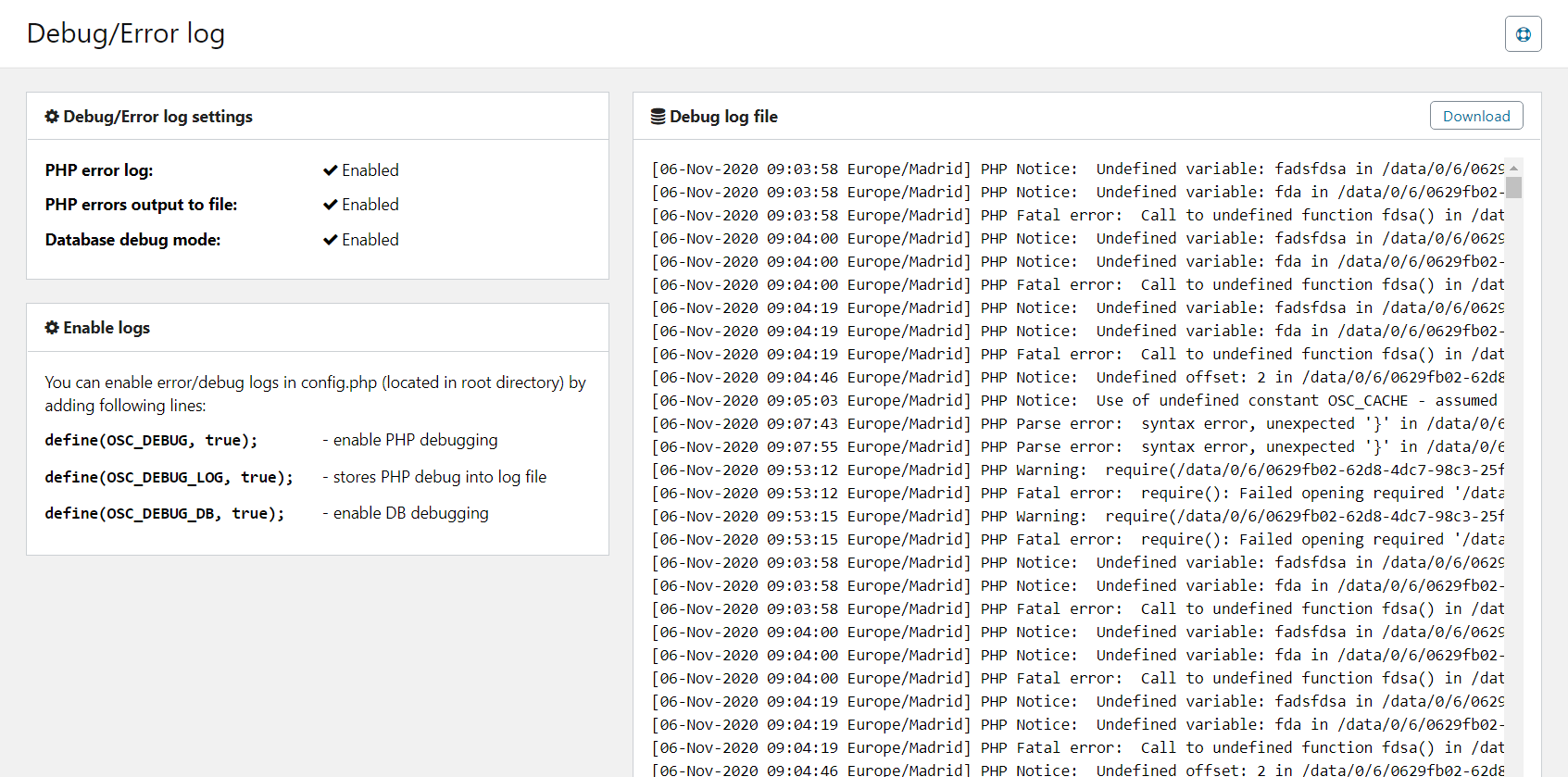
Pair with the configuration information page.
Frequently asked questions
Question: Where do I read Osclass debug.log in Tools, Debug/Error log?
Answer: Open oc-admin, Tools, Debug/Error log. The right pane shows debug.log when file logging is on. The left pane shows whether debug modes are enabled. Those modes should be off on a live classifieds site. An empty right pane means logging is off or the file was never created.
Question: How do I enable OSC_DEBUG_LOG in Osclass config.php?
Answer: Set OSC_DEBUG_LOG to true in config.php so PHP errors write to debug.log. Open Tools, Debug/Error log to read the file. Keep display_errors off for visitors, then turn the constant off when the issue is fixed. Copy the stack trace first so you can disable logging quickly.
Question: Why should Osclass debug stay off on a live classifieds site?
Answer: Debug output can print paths and queries on the front office and slows the site. Tools, Debug/Error log shows if debug is enabled. On production, keep it off and use OSC_DEBUG_LOG only while you copy a stack trace, then disable it. Leave display_errors off for visitors.
Question: What does the left sidebar mean on the Osclass Debug/Error log page?
Answer: The left sidebar of Tools, Debug/Error log reports which debug modes are on and how to enable file logs. The right sidebar is the debug.log body. If the right pane is empty, OSC_DEBUG_LOG is false or the file was never created. Enable logging, reproduce the error, then turn it off.
About the Author
My passion is building classifieds marketplaces, automating workflows, and turning messy data into useful products. From PHP, HTML, CSS, and JavaScript to Python, crawlers, imports, and SEO, I enjoy solving technical challenges and sharing lessons learned from real-world projects. Most ideas start with a problem, a cup of coffee, and a curiosity to see how far automation can go.
Osclass, PHP, JavaScript, CSS, Python
56 posts
Publishing since 04/2018
Account license types
Available license types:
-
Single License
Use on 1 website domain.
The Single Site License allows you to use the product on 1 domain only. This license is intended for individual website owners or single-project installations.
-
Extended License
Use on up to 20 website domains.
The Extended License allows usage of the product on up to 20 domains under a single account. This license is intended for agencies and businesses operating multiple installations. Pricing is calculated as 3x the base product price.
Product pricing is calculated as 3x the base product price.
Account License Types
Your account license type determines how many domains you can use purchased products on. It is applied account-wide, affecting all products you buy under this account.
Changing License Type
You can change your account license type only if you have no active orders or support subscriptions. This means you must not have purchased any product in the last 365 days. Once a product has been purchased, your account license type cannot be changed again.
Impact on Product Pricing
Changing your account license type updates the price of products visible on the page according to the license multiplier. Higher-tier licenses for multiple domains increase the product price accordingly.
Domain Usage
Your license grants the right to use purchased products on the number of domains allowed by your license type — 1 domain for Single Site, up to 5 domains for Extended, or up to 20 domains for Enterprise.
Resale Restrictions
The license does not give you rights to resell the product. It is intended solely for use on your registered domains.
Cookie Preferences
This website uses its own and third-party cookies to improve our services and show you advertising related to your preferences by analyzing your browsing habits. To give your consent to its use, press the "Accept all" button.
Read more.
This website uses its own and third-party cookies to improve our services and show you advertising related to your preferences by analyzing your browsing habits. To give your consent to its use, press the "Accept all" button.
Read more.
Functional cookies are strictly necessary to provide the services of the classifieds, as well as for its proper functioning, so it is not possible to refuse their use. They allow the user to browse through our website and use the different options or services that exist on it.
Collect information about the user's browsing experience in the classifieds, usually anonymously, although sometimes they also allow the user to be uniquely and unequivocally identified in order to obtain reports on the user's interests in the products or services offered by the classifieds.
These are used to improve the browsing experience and optimise the operation of the classifieds.
These are cookies without a clear purpose or those that we are still in the process of classifying.