

Spam on Osclass forms is not a new problem. Fake registrations, contact messages with bad links, and bot comments still show up on production sites every week. For years, most owners relied on built-in Osclass reCAPTCHA or third-party plugins that used Google keys from the old admin console.
In June 2026 we published two new plugins in the Security & Anti-Spam category: Cloudflare Turnstile reCaptcha Plugin and Google reCaptcha Enterprise Plugin. Both target the same Osclass forms. They differ in provider, setup, and how much detail you get back when a submission is blocked.
This article explains why we built them now, what Google changed in the first half of 2026, and how to choose between Turnstile and Enterprise on a real classifieds site.
Support tickets about contact form spam and fake user accounts never fully stopped. What changed in 2026 is the tooling around Google reCAPTCHA.
Google has been moving classic reCAPTCHA keys into Google Cloud for some time. According to the official migration overview, classic keys were migrated to Cloud projects, new classic keys are no longer created, and site owners are expected to manage keys in Google Cloud Console instead of the old standalone admin.
On 2 April 2026, Google announced another shift: reCAPTCHA moves from acting as a data controller to a data processor for customer deployments. Google published this in their security community blog. In practice, the site owner becomes responsible for how reCAPTCHA-related personal data is described in the privacy policy. Google also stated that references to Google Privacy Policy and Terms on the reCAPTCHA badge would be removed from customer deployments.
In May 2026, Google shipped reCAPTCHA Mobile SDK 18.9.0 with score calibration changes. The release notes explicitly recommend reviewing score thresholds if false positives increase. That matters for score-based v3 and Enterprise setups where you accept or reject a form based on a numeric score.
None of this means Osclass itself broke. It means owners who still run legacy key workflows need a clear path forward, and owners who want to leave Google entirely need a working alternative. That is the background for both plugins.
Both plugins hook into the same standard Osclass forms. You enable each form separately in plugin settings:
Integration uses Osclass hooks. Themes such as sigma that already call contact_form, user_register_form, and similar hooks do not need template edits for the default case. Custom forms can use display and verify hook pairs documented on each product page.
Both plugins also include:
Before enabling either plugin, disable built-in Osclass reCAPTCHA under Settings > Spam and Protection. Running two captcha systems on one form causes duplicate widgets and failed submissions.
Cloudflare Turnstile reCaptcha Plugin connects Osclass to Cloudflare Turnstile. Turnstile is Cloudflare's bot check service. It is free at the widget level: you create a Turnstile widget in the Cloudflare dashboard and receive a Site Key and Secret Key.

The plugin renders a Turnstile widget inside protected forms. The visitor completes the check in the background in most cases. There is no classic distorted text captcha. Widget mode (Managed, Non-Interactive, or Invisible) is chosen in Cloudflare, not in Osclass.
In plugin settings you can set widget theme (auto, light, dark) and size (normal or compact).
On submit, the plugin sends the token to Cloudflare Siteverify API. The result is stored in the verification log with form name, pass/fail, error code, IP, and hostname.
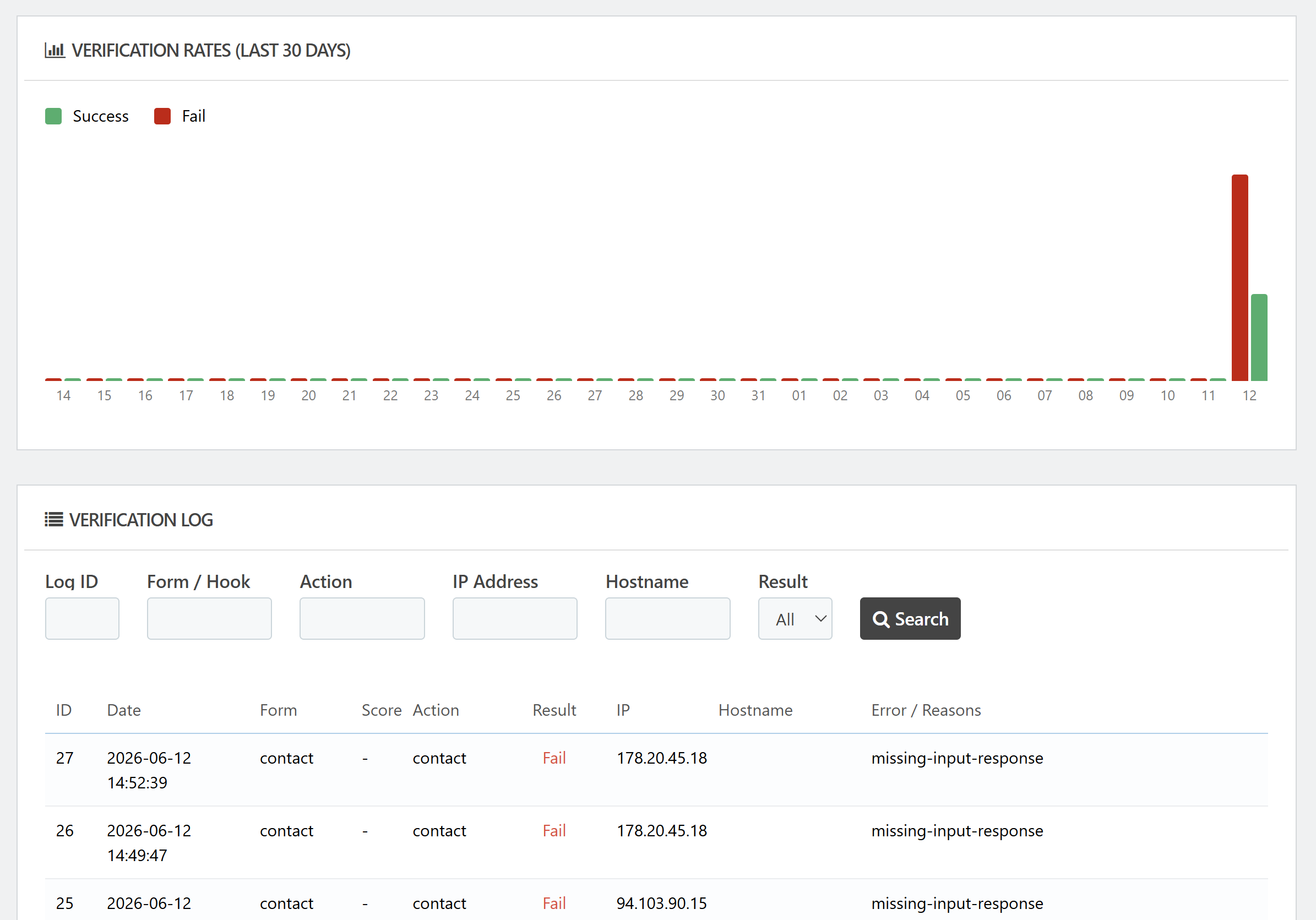
Folder name after install: cloudflare_recaptcha. Requires Osclass 8.0 or higher. Version 1.0.0 shipped 12 June 2026.
Google reCaptcha Enterprise Plugin is aimed at owners who want to stay on Google and use the current Enterprise assessment flow instead of legacy siteverify-only plugins.
It is the practical upgrade path if you already run Invisible reCAPTCHA, classic reCAPTCHA v3, or an older checkbox plugin on Osclass. Visitors still see score-based invisible protection and a small Google badge. The change is on the server: submissions are verified through the reCAPTCHA Enterprise Assessment API, which returns a risk score, action name, and related metadata.
This is where setup is stricter than Turnstile. You need three values from Google Cloud:
The legacy secret key shown on some old reCAPTCHA pages is not used. If you paste the wrong key type, assessments fail with API errors. The plugin backoffice includes a test panel and a step-by-step setup guide to reduce that support case.
Default score threshold in the plugin is 0.5. Submissions below the threshold are rejected and logged.
Because Google adjusted score distribution in May 2026, you should treat the default as a starting point. If legitimate users are blocked after an SDK or platform update, lower the threshold slightly and watch the verification log. If spam still passes, raise it. The log shows the exact score per attempt, which legacy pass/fail plugins did not store.
With Google as data processor, you should review your site privacy policy if reCAPTCHA processes personal data from EU visitors. Google documents this in the April 2026 announcement linked above. Enterprise customers typically rely on Google Cloud data processing terms. This is a site-owner compliance task, not something a plugin can solve automatically.
Folder name after install: googlev3_recaptcha. Requires Osclass 8.0 or higher. Version 1.0.0 shipped 12 June 2026.
| Topic | Cloudflare Turnstile | Google reCAPTCHA Enterprise |
| Provider account | Free Cloudflare account | Google Cloud project |
| Keys required | Site Key + Secret Key | Site Key + Project ID + API Key |
| Server verification | Cloudflare Siteverify | Enterprise CreateAssessment |
| User experience | Turnstile widget (mode set in Cloudflare) | Invisible score v3 + Google badge |
| Risk score in log | No | Yes (0.0–1.0) |
| Setup difficulty | Low | Medium (GCP console) |
| Best fit | Fast setup, no Google dependency | Google stack, scored audits, v3 upgrade |
Do not install both plugins with the same forms enabled. Pick one provider per site.
We tested both plugins on sigma and on demo installations used for other OsclassPoint products. A few findings are worth sharing because they affect real sites, not just demo pages.
Sigma's contact form uses jQuery Validate. Its submitHandler calls native form.submit(), which skips normal submit handlers. That pattern broke early Enterprise builds: the Google badge loaded, but g-recaptcha-response was missing from POST data and the server returned a verification error while the email sometimes still sent.
The fix follows the same approach we have used for years in Invisible reCAPTCHA Plugin: intercept the submit button click, run HTML5 and jQuery validation manually, obtain the token, write it to the form field, then submit. The released Enterprise plugin uses plain JavaScript for that flow. Turnstile uses the widget callback model, which fits Turnstile's API design.
Both plugins support hiding captcha for logged-in web users. If you are logged into the Osclass backoffice in the same browser, Enterprise keeps protection visible so you can test forms without logging out of the front office account. This avoided a common support scenario where the site owner thought the plugin was broken while logged in.
oc-content/plugins/ if neededGoogle reCAPTCHA in 2026 is not the same service many Osclass owners configured five years ago. Keys live in Google Cloud. Legal roles around data processing changed in April. Score behaviour was tuned in May. If you want to stay on Google with scored assessments and a clear upgrade from older v3 plugins, use Google reCaptcha Enterprise Plugin.
If you prefer free Cloudflare Turnstile, minimal setup, and no GCP billing context, use Cloudflare Turnstile reCaptcha Plugin.
Both products share the same Osclass form coverage, logging model, and hook-based integration. The difference is provider, setup depth, and whether you need numeric risk scores in your backoffice. Pick one, disable the other captcha systems on the same forms, and verify real submissions in the log before you consider the job done.
If you hit a edge case on a custom theme, open a support ticket with the form URL, theme name, and a screenshot of debug mode. Most issues we saw in testing were form JavaScript related, not Osclass core bugs.
Question: Which Osclass captcha plugin should I use instead of Google reCAPTCHA?
Answer: Use OsclassPoint Cloudflare Turnstile reCaptcha plugin if you want Turnstile. Create a widget in Cloudflare and paste site key and secret into the plugin. Disable built-in Osclass captcha under Settings, Spam and Protection first. For the same form, use one primary captcha unless you understand both validation flows.
Question: What credentials does Google reCAPTCHA Enterprise plugin need in Osclass?
Answer: OsclassPoint Google reCaptcha Enterprise plugin needs a site key, a Google Cloud project ID, and an API key. The old reCAPTCHA secret key from the classic admin is not enough. After save, test registration and contact. Check the plugin verification log if the widget shows but submit fails.
Question: Why does the old reCAPTCHA secret key fail in Osclass Enterprise plugin?
Answer: Classic keys moved into Google Cloud and new classic keys are not created. Enterprise verification uses the Cloud API key plus project ID, not the old secret. Paste the new values in Google reCaptcha Enterprise plugin. Leave the classic secret unused. Confirm the widget on a form after save.
Question: How do I fix missing g-recaptcha-response on OsclassPoint Sigma contact with Enterprise captcha?
Answer: Adjust Sigma jQuery Validate submitHandler so it waits for the g-recaptcha-response token before the contact form submit. OsclassPoint Google reCaptcha Enterprise plugin documents that Sigma wait on the product page. Without that wait, server-side verify fails even when the widget shows. Test contact after the theme change.
Question: What score threshold should I use for Google reCAPTCHA Enterprise in Osclass?
Answer: Start with the plugin's default 0.5 threshold, monitor verification results, then raise it for stricter filtering or lower it when legitimate users are rejected. This applies to score-based Enterprise, not Turnstile. Watch the plugin log after you change the value. There is no calendar date that requires a new default.
Question: Can I run Turnstile and reCAPTCHA Enterprise together on Osclass registration?
Answer: For the same Osclass form, use one primary captcha integration unless you have implemented both and know how their validation flows interact. Disable core captcha first under Settings, Spam and Protection. Two widgets on one form often confuse submit. Pick Turnstile or Enterprise, then test register.