
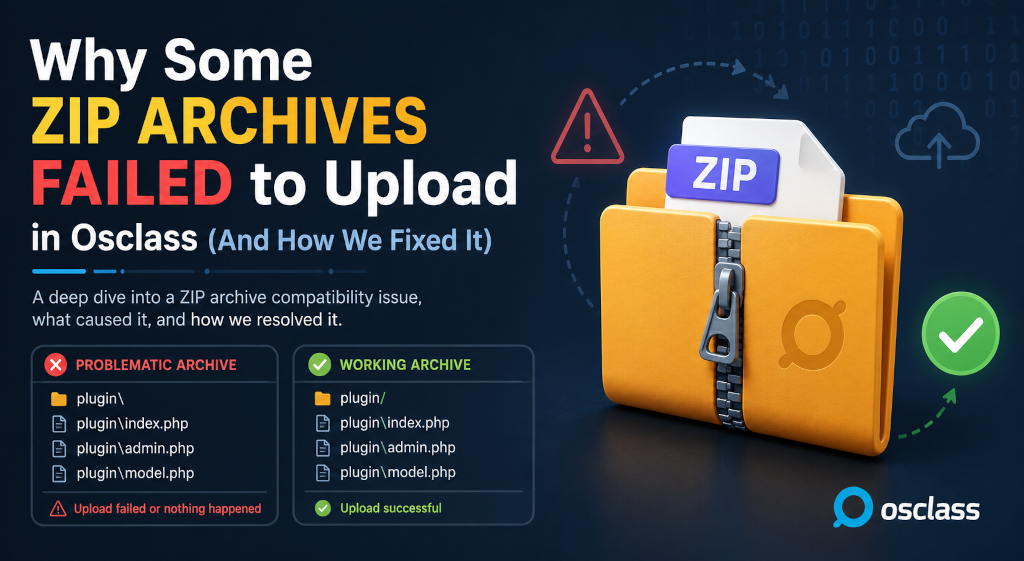
Recently I've faced several support tickets from customers complaining that product uploads and installations from ZIP does not work as expected. After selecting zip file to upload in Osclass oc-admin - no matter if it was theme or plugin, either there was error "The zip file is not valid" or there was success message but nothing really happened.
Investigation itself was not that simple as it was not reproducible on all Osclass installations and updates of existing products sometimes worked fine without any issue and we needed to expand analysis over multiple Osclass instances with different versions to identify root cause.
First issue we've found was that some archives has been generated in Unix style. What it means? Well, only problem was that paths of files was using backslash \ instead of standard windows slash /.
No special tools are required for this - just text editor like Notepad or Notepad++. When you right click on archive and open it with standard text editor, usually when you scroll down to part where files are listed, you can find what slash is used, if it's Unix style with \ or Windows style with /
Unix backslash in ZIP:

Windows slash in ZIP:

How to fix: Easiest wa you fix this problem is simply re-zip archive on your desktop. Use ie 7zip, extract all files and put them back into new ZIP archive. After this action you should see Windows slash in archive. Then upload theme/plugin into Osclass backoffice.
While fixing Unix backslash to Windows one fix problem with false updates and uploads, real problem is not with backslash - becuase PHP ZIP library can identify what slash is used and how to handle it. Real problem is different.
When you would use PHP ZIP extension to analyze problematic ZIP file, besides having Unix backslash you might notice that in this style of ZIP archive folders are not explicitely defined.
$zip = new ZipArchive();

if($zip->open('archive.zip') === true) {
  echo 'Entries: ' . $zip->numFiles;

  for($i = 0; $i < $zip->numFiles; $i++) {
    $file = $zip->statIndex($i);

    echo htmlspecialchars($file['name']);
  }

  $zip->close();
} else {
  echo 'Cannot open ZIP archive';
}
What does that mean? Osclass when extracting ZIP is not really checking if file has or has not folder created. It simply expects that as it loop through ZIP archive entries, first folder is listed and then files are followed. This is not true with Unix zip - folders are not there and files are not unzipped until folders were explicitely created in target destination.
As mentioned before, easiest fix is to simply re-zip archive on your desktop. Long term fix is different and will be applied in Osclass core v8.4.
Osclass update: Starting with Osclass 8.4, when unzipping themes, plugins, language files etc. Osclass will verify if given folder of file exists already - and if not, folder will be automatically generated by Osclass. So from 8.4 explicit definition of folders in ZIP will not be required and upload will be just fine.
In case you encounter issue with uploading ZIPs into Osclass, follow these steps:
If you feel that support team is not doing enough for you, don't fall into false feeling. We always collect and double-review all tickets and patterns in tickets and as far as we notice customers started to have same kind of issue, we are working hard to identify root-cause, not just patch current problem - but this may take longer as you think.
Hope this article helps you to get your products updated and ready to use in future!
Safer downloads: downloading products securely.
Question: How do I fix The zip file is not valid when uploading an OsclassPoint plugin?
Answer: The zip file is not valid usually means a corrupt download, an extra wrapper folder, a nested ZIP, or an archive layout the Osclass extractor cannot unpack. Re-download the file, extract it locally, and zip the plugin or theme folder so index.php sits at the expected depth. Then upload again in oc-admin.
Question: Why does an Osclass plugin ZIP contain an extra folder after extract?
Answer: Many archives wrap the product in an extra directory, so oc-admin extract lands one level too deep and the plugin does not activate. Extract locally and re-zip so the plugin folder itself is the archive root. Nested ZIPs inside the download cause the same miss. Confirm index.php is visible at the product root.
Question: What should I check if Osclass ZIP upload fails with permissions errors?
Answer: If extract fails, check that oc-content/plugins or oc-content/themes is writable on Tools, Configuration information. Hosting ownership can block the extractor even when the ZIP is valid. Fix permissions, then upload again. A nested ZIP or extra folder is a different failure and still needs a re-zip.
Question: Does Osclass 8.4 still fail on ZIPs without folder entries?
Answer: Osclass 8.4 creates missing folders while unzipping themes, plugins, and languages, so some archives that failed on 8.3 may install. On 8.3 and older, re-zip so directories exist. Test extract on staging, then confirm the plugin or theme appears in oc-admin. A nested ZIP or extra wrapper folder can still fail on 8.4.
Question: Why did Osclass say the ZIP uploaded but nothing was installed?
Answer: A success message with an empty plugin or theme folder often means the archive had an extra directory, a nested ZIP, or files the extractor skipped. Extract locally, confirm the product root, re-zip, and upload again in oc-admin. Check folder permissions if extract still writes nothing.
Question: Should I send a failing theme ZIP to OsclassPoint support?
Answer: Re-download, extract, and re-zip on your computer, then test on staging first. If it still fails, send the ZIP plus whether it had an extra folder, a nested archive, or a permissions error on oc-content. OsclassPoint support can check an entitled package. Include the exact oc-admin message.