
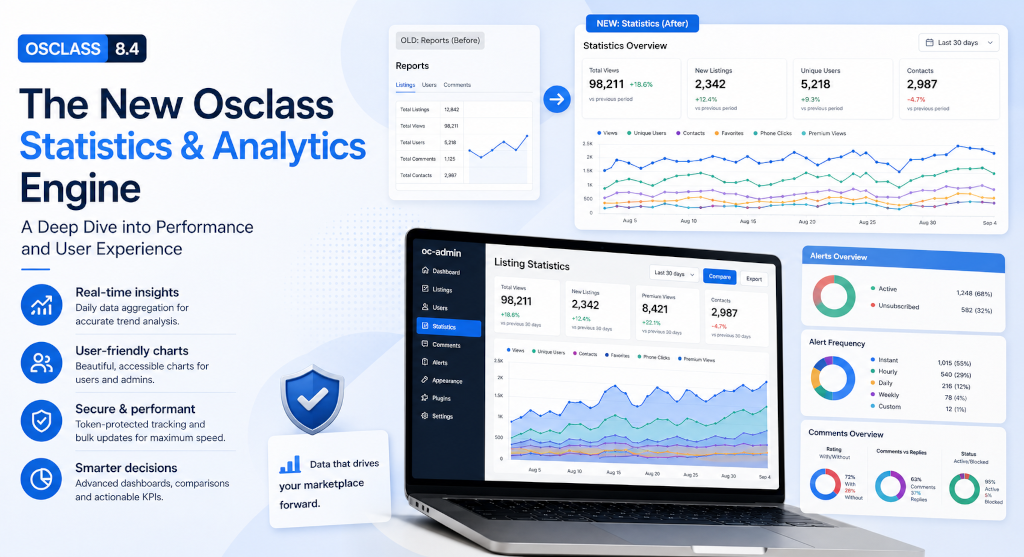
It used to be hard to know exactly how people used a listing. Osclass counted views. That was often the whole report.
When I sat with customers to go through numbers, the conversation usually died at listings. Hosting had graphs. Ads had reports. Osclass statistics were a blank cell. The old totals were thin, often duplicated, and they did not answer the questions people actually asked.
A car dealer does not pay a publish fee to learn that "someone opened the page." A real estate agency does not buy highlight to guess whether anyone tapped the phone number. Job sites, large sellers, and agencies said the same thing in different words: show me why this listing is worth the money I put on it.
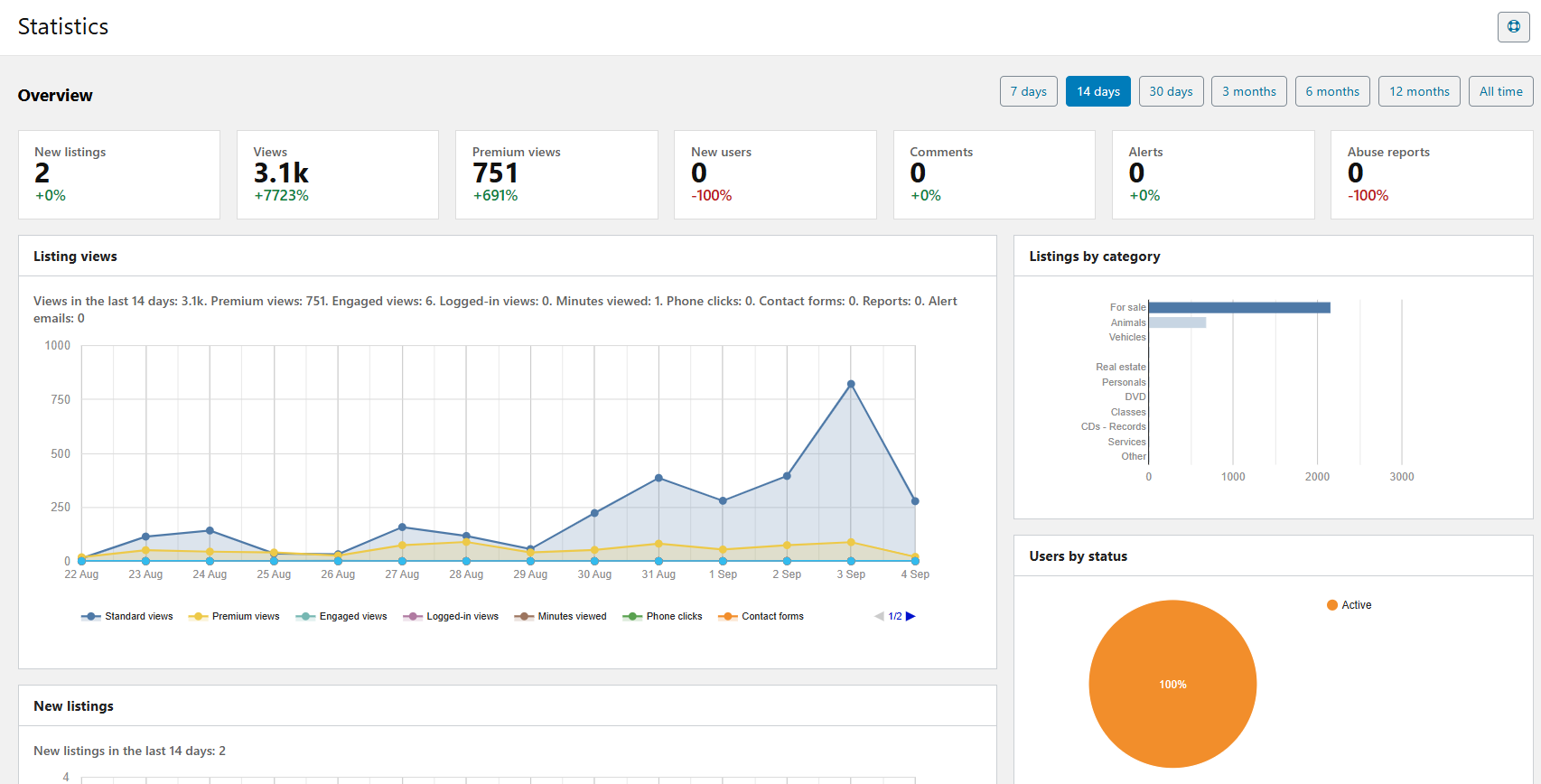
That is what this rewrite of Osclass analytics is for. Daily measures in t_item_stats. Charts in the user account. An admin Osclass dashboard that compares one period to the last. One table for core events and for plugin events Osclass never had to "know" by itself: orders, WhatsApp clicks, offers.
If you run classifieds software at any serious volume, you
already know the gap. Views without behavior are not classified site analytics. They only tell you the page opened.
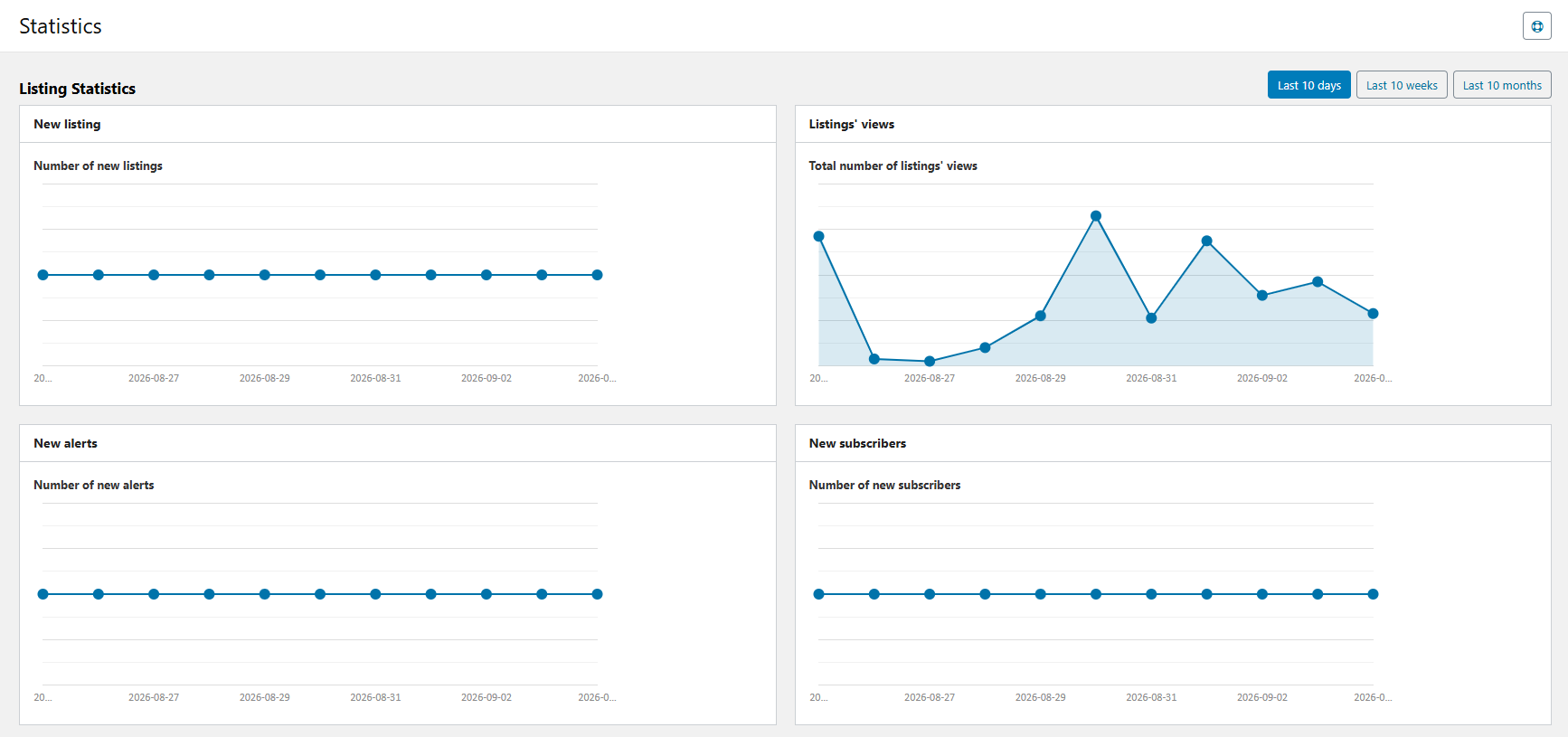
The requests were specific. Not "more stats." These reports:
There was a second gap on the seller side. Some numbers existed in the database. Users had almost no way to see them per listing. Agencies and dealers could not open an Osclass dashboard and check views, contacts, or premium performance after they paid.
If you cannot see listing statistics, you cannot see the value of a publish fee, premium, or highlight. You cannot see how many people contacted you. You are buying visibility in the dark.
Those marketplace KPIs now live in one daily row per listing. Analyzing them is simpler than it ever was, because everything sits in one line of the same table.
|
What they asked |
Measure in Osclass |
Why it exists |
|
Did anyone click the listing in a useful way? |
phone_clicks, contactother_clicks, shares |
Clicks beat raw Osclass listing views when you decide if a listing works. |
|
How many were sold? |
orders |
Osclass core has no checkout. Payment plugins write this column. |
|
Are views unique enough to trust? |
views + session method, views_logged |
One view per session stops refresh inflation. Logged-in views split known users. |
|
Did homepage placement help? |
views_home |
Home impressions show if latest listings on home are doing work. |
|
Did they actually look? |
views_engaged |
A visit that stayed the configured number of seconds. |
|
How long did they stay? |
view_minutes |
Full minutes the listing tab stayed visible. |
|
Did they write to us? |
contactforms, contacts |
Contact form sends and messenger threads about the listing. |
|
Did they call? |
phone_clicks |
Tap on the telephone control, including reveal-to-call on mobile. |
|
Was premium worth it? |
premium_views, promotions |
Premium impressions and paid promotions on that listing. |
Osclass itself does not sell orders. It does not know WhatsApp. Price offers are usually a plugin. Skipping those columns because they are not core would have left the same hole: plugin authors inventing extra tables, users hunting in three screens. Capture the event in a plugin. It shows up in Osclass statistics next to views and phone clicks.
This is also why paid listing features need a readable chart. If you charge for premium or highlight, keep this next to how you actually bill those products: Osclass Pay compared with Payments Pro.
t_item_stats now stores daily measures: views, premium views, engaged views, phone clicks, and the rest. Charts can plot a time series without scanning every click forever. That is how a high-performance classifieds script should treat analytics: aggregate on write, read cheap.
Plugins can bump many listings in a single query with osc_increase_item_stats(). Search result impressions and homepage impressions need that. One query for a page of results beats one query per card. The singular helper osc_increase_item_stat() is for one listing. Use the plural when you have a list of IDs.
The public AJAX endpoint that records engaged views, minutes, phone clicks, and similar events now requires a CSRF token (octoken). Without it, the write does not go through. That is not optional polish. It stops anyone from incrementing counters with a forged request.
Osclass is not Google Analytics - cannot reliably capture "unique view". Choose one view per session or one view per page load. Session mode is what most sites want: it stops the old duplicate-view mess. It still is not a fingerprint of every human, but provides much better numbers as not using this mode
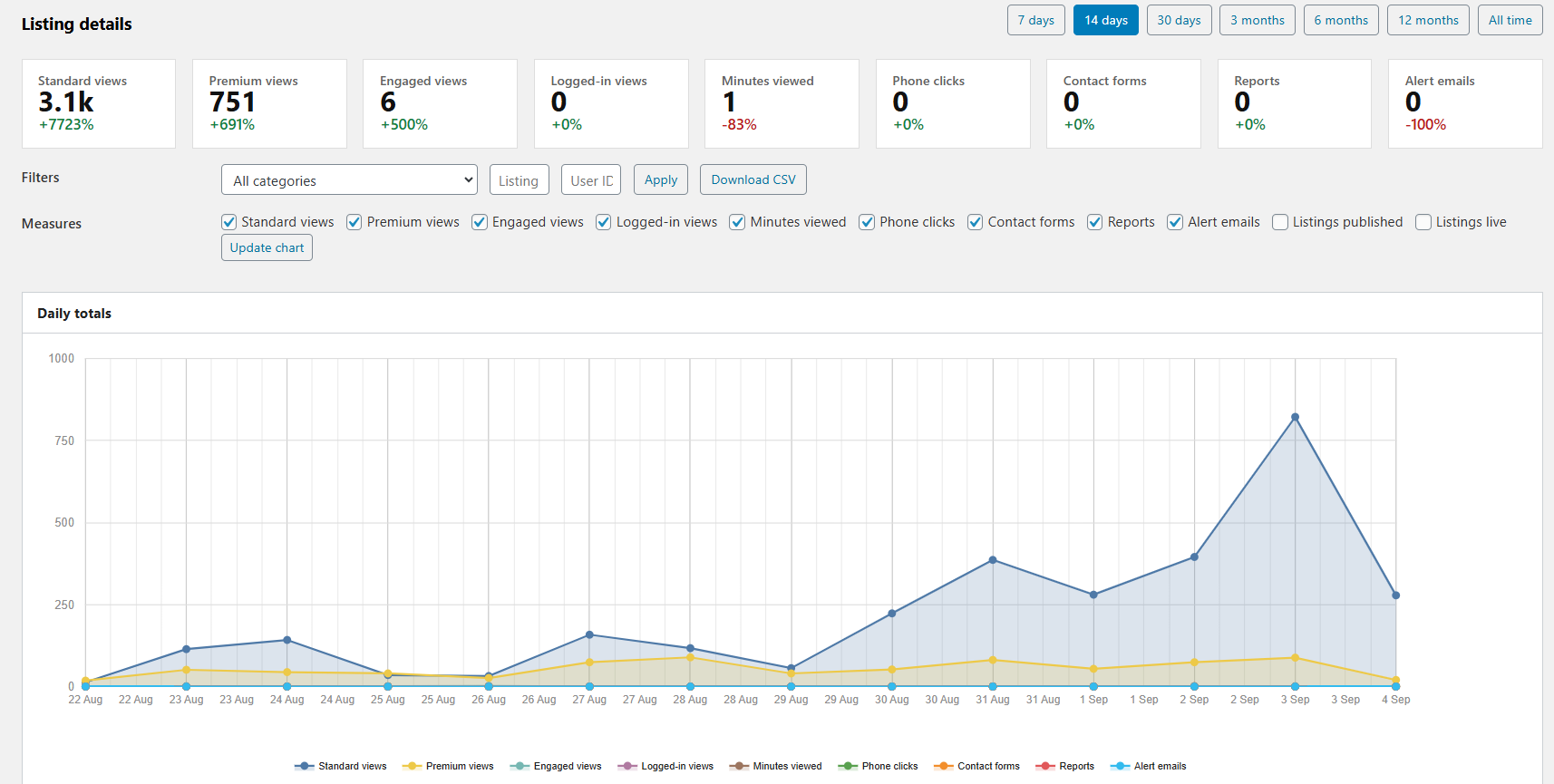
Charts die when you plot twelve lines on day one. Start with Essential. Turn on more when you know what you will actually read. That is a UX choice, not a feature lock.
You can still tick measures by hand. The preset is the fast path for admins who want clean Osclass charts first.
Extra impression rows have a cost. If you are also chasing load time, keep this next to the performance checklist: How to improve Osclass load speed.
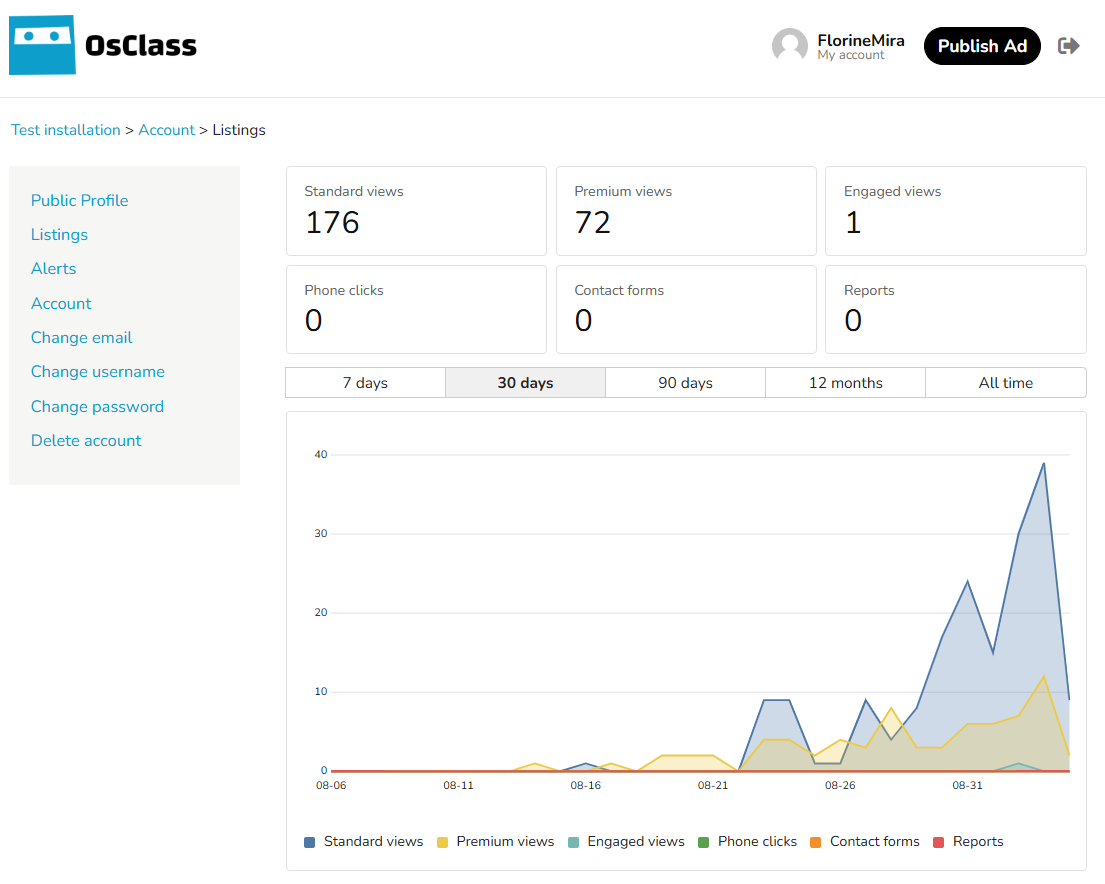
Now your sellers track listing performance from their own account. That is user retention for the people who pay you: they see Osclass listing views, phone clicks, and contact forms on the same plot.
The summary chart hangs on the user_items_top hook by default. You can move it. Statistics settings let you name which hooks render the block, so a theme can place it on My listings, the user dashboard, or both.
Lines you can tell apart
Lines use a 16-color Tableau palette. Six measures on one chart stay distinct, including for readers who cannot rely on red vs green. You can replace the palette with the osc_item_stats_palette filter if your brand needs its own set.
Period tabs (Last 7 days, 14, 30, plus longer ranges such as 90 days, 12 months, and all time) are configurable. You choose which tabs appear so a small site is not offered ranges it cannot fill.
Two small chart rules change how the plot feels: a border around the plot so the series sit in a defined area, and Y-axis ticks as whole numbers with no repeated labels. That is the difference between a widget and a report people trust.
Who sees the charts is an audience setting: all users, or company users only. Plugins can extend that list with osc_item_stats_chart_audience_options. That is the switch agencies asked for: show charts to dealers, hide them from casual posters if that is your model.
If you place the chart with a hook in a child theme instead of editing the parent, follow the same pattern as other theme custom work: Osclass child theme guide.
The listing statistics page uses a 65/35 split. The chart gets the wide column. KPI cards stay on the side so you can read the plot and the totals without scrolling past a stack of boxes. Older layouts starved the chart. This one gives the chart the space it needs.
Each card can show change versus the previous period. New listings: 34 (+12%) means this period beat the last one by 12%. If the previous period was 0, the card shows +0% instead of a broken percentage. You get a comparison you can act on, not a divide-by-zero glitch.
The selected period is stored in a cookie. Leave the page, come back, your filter is still there. Admins who live in oc-admin should not have to reset Last 30 days every visit.
This is the Osclass admin panel people meant when they asked for real reports: a period you can compare, not a dump of all-time totals.
High-level module notes still live in the docs: Statistics in the Osclass knowledge base. The pages in oc-admin are what you will actually click.
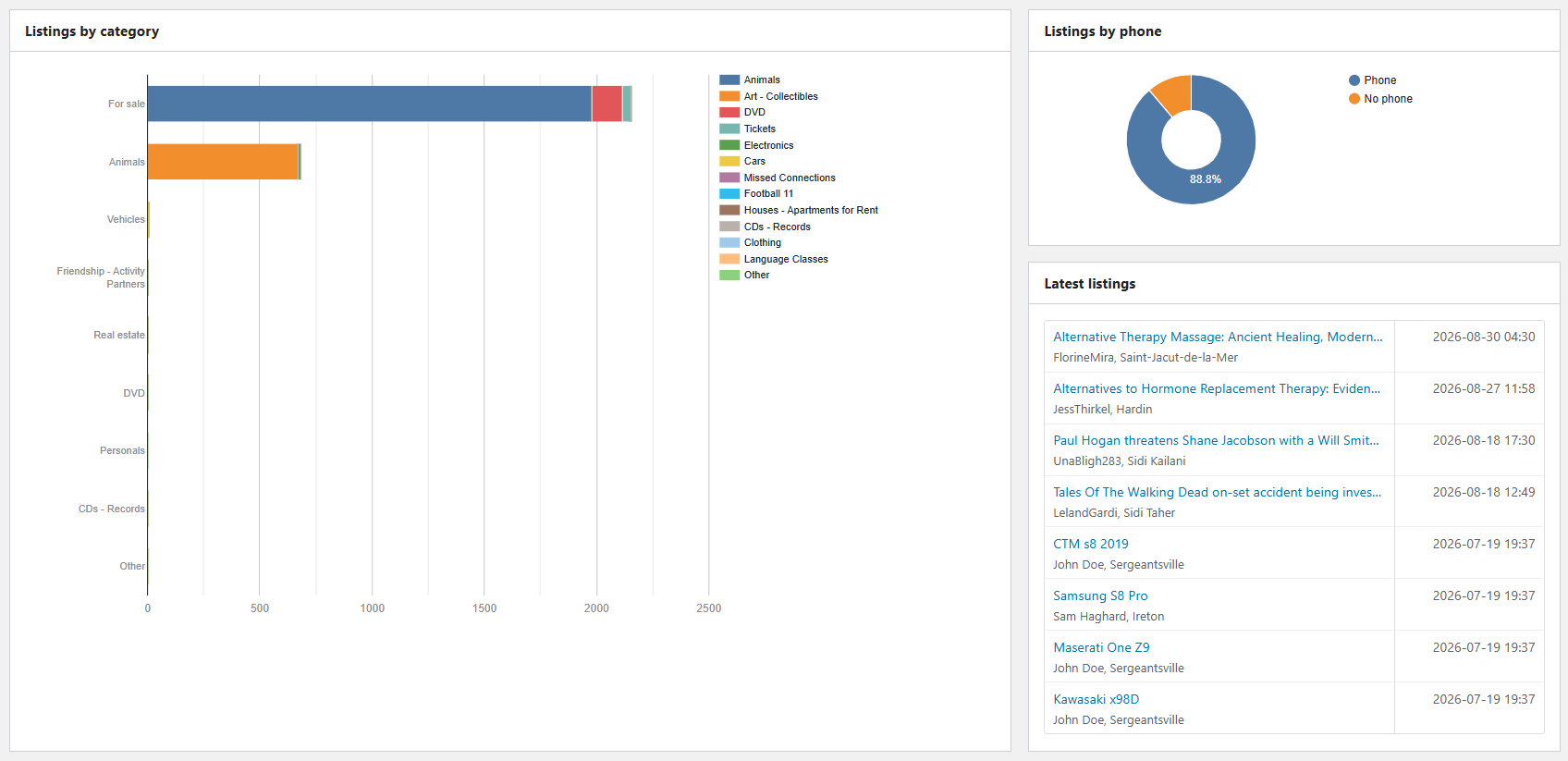
Moderators need more than traffic. They need to see comments. Operators of classifieds software need to know if instant alerts will overload the server.
Comments now have pie and donut charts: ratings with vs without, comments vs replies, status active vs blocked. You can see whether people are leaving scores or only text, whether threads are replies or first notes, and how much is blocked.
Latest comment lists include extra context: comment text and contact name. That improves the investigation path. You open a thread and judge it. You do not guess from a username and a date.
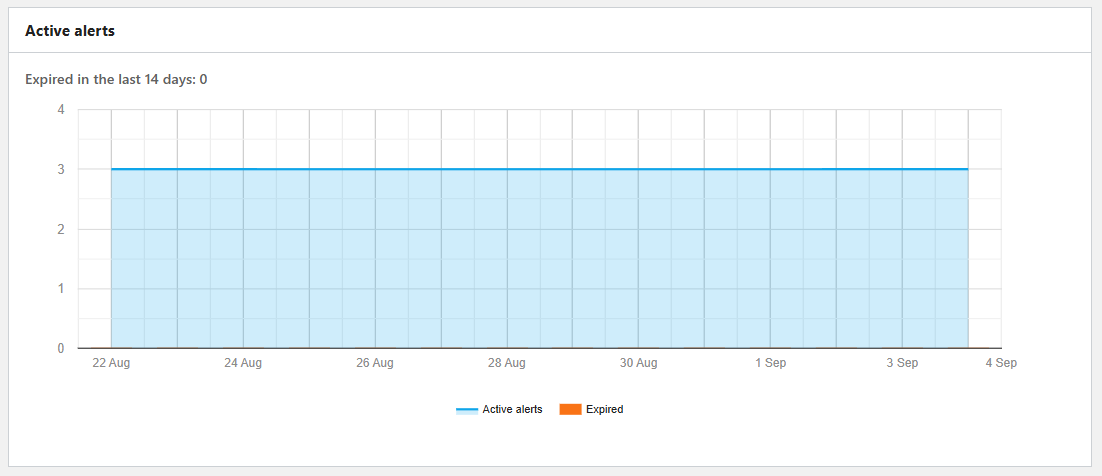
Alerts have their own statistics page. Track unsubscribed vs active. Break down frequency: Instant, Hourly, Daily, Weekly, Custom. Instant alerts on a large catalog are a load decision. You need that split if you run classifieds software at scale.
Daily cron can purge t_item_stats rows older than your retention period (default 24 months). You are not expected to babysit table growth. Set the months in Statistics settings. Run the same cleanup from Tools when you want it now. Automatic and manual paths delete the same old daily rows.
Comment counters are repaired by daily cron so totals can be brought back in line. Views are event counters. They are not recalculated from scratch. Replaying every view would burn resources for little gain. Keep that distinction when someone asks "why doesn't Repair fix my view count?"
Minutes viewed use the browser sendBeacon API when the tab closes. If someone leaves in a hurry, the last minute still has a chance to be recorded. That is why time-on-listing is usable for classified site analytics instead of dying with the page.
For a wider health check of PHP, database, and folder size, use the configuration information page: Osclass system information page.
If you maintain a theme or plugin, do not start a second stats table unless you have a reason. Increase a measure. It appears in user charts and in admin Osclass statistics. Plugin authors already extend Osclass this way, which is why people keep it as classifieds software on live sites. Core stores the day. Plugins fill columns for cars, jobs, or real estate. Operators who call Osclass the best rated classifieds software they run are usually talking about this kind of hook, not a locked report pack.
Single listing vs bulk
// One listing
osc_increase_item_stat('phone_clicks', $item_id);

// Many listings, one query (search, home, premium cards)
osc_increase_item_stats('views_home', $item_ids);
|
Filter / helper |
What it is for |
|
osc_item_stats_palette |
Replace the 16-color Tableau palette (accessibility and brand). |
|
osc_item_stats_ajax_measures |
Extend the public AJAX allowlist (share clicks, custom clicks). Blocked keys cannot be opened from AJAX. |
|
osc_admin_stats_add_chart |
Queue a plugin chart on the current admin Statistics page. |
|
osc_item_stats_chart_audience_options |
Add who may see front-office charts (beyond all / company). |
|
osc_item_stats_measures |
Register extra measure metadata if you extend the registry. |
|
osc_increase_item_stat() |
Increment one listing. |
|
osc_increase_item_stats() |
Increment many listings in one query. |
Example: a plugin records a WhatsApp-style click and allows a custom AJAX measure for a share button you added in the theme.
// Record a WhatsApp-style click from a plugin
osc_increase_item_stat('contactother_clicks', $item_id);

// Let the public AJAX endpoint accept a custom click
osc_add_filter('osc_item_stats_ajax_measures', function($keys) {
  $keys[] = 'custom1';
  return $keys;
});
We focused on making data useful, not only collected. Open Statistics settings. Try Engagement if you care about homepage and search impressions, shares, and comments. Try Commerce if you run orders, offers, or messenger contacts through plugins.
Collect what you will read. Show sellers the chart that justifies the fee. Keep one line per listing per day so Osclass analytics stay fast. Later updates can add charts without inventing another table.
Primary CTA: Open Statistics settings and try the Engagement or Commerce preset.
Companion change: the new reporting workflow. Overview: Osclass 8.4 rebuild.
Question: Where do Osclass sellers see listing statistics charts in Osclass 8.4?
Answer: Sellers see Osclass 8.4 listing charts on the user items top area of their account, driven by daily rows in t_item_stats. Admins have a separate Statistics dashboard that compares one period to the last and can export CSV. Enable a preset so the chart has measures to plot. Views without those extra columns were the old report.
Question: How does Osclass 8.4 stop listing view counts from refresh spam?
Answer: Osclass 8.4 counts one view per session instead of one per page load, and can split views_logged for signed-in users. CSRF token octoken is required on AJAX increments. Refreshing the listing tab does not add a new view in the same session. Check t_item_stats after a test visit to confirm the increment.
Question: How does a plugin record WhatsApp clicks with osc_increase_item_stat in Osclass?
Answer: Call osc_increase_item_stat or osc_increase_item_stats from the plugin when the WhatsApp control is used. Osclass 8.4 core does not know WhatsApp by itself. The value lands in t_item_stats for that listing and day. phone_clicks is the core column for tap-to-call, not WhatsApp. Test a click, then check that listing row.
Question: Why does Repair not rebuild Osclass listing views in t_item_stats?
Answer: Repair does not reconstruct historical listing views. In Osclass 8.4, t_item_stats only stores what was incremented after the overhaul. Missing days stay empty. Do not expect Repair to invent phone_clicks or view_minutes from old log files. Run Repair for table structure, then start collecting new daily rows.
Question: What is the difference between Essential, Engagement, Commerce, and Full Osclass 8.4 statistics presets?
Answer: Osclass 8.4 presets are Essential, Engagement, Commerce, and Full. Pick one in oc-admin to choose which t_item_stats columns to collect. Essential stays light; Engagement adds time-on-page; Commerce adds orders; Full enables the complete set. Those presets are not the seller account chart. Enable a preset before you expect plots.
Question: What does phone_clicks mean in Osclass t_item_stats?
Answer: phone_clicks counts taps on the listing telephone control, including reveal-to-call on mobile. It is not WhatsApp and not contact form sends (contactforms). Session views stay in a different t_item_stats column. Plugins add other click types with osc_increase_item_stat. Check the listing stats row after a phone tap.