
Osclass has been in continuous development for about 15 years. The classifieds script now runs production sites well past simple listings: full marketplaces, agency portals, and vendor networks. The Osclass 8.4 update rebuilds systems that already exist, not a pile of new features.
We rebuilt the backoffice data tables, listing statistics, reports, widgets, alerts, and the screens that manage currencies and categories. Those are the systems this article covers.
Release at a glance
- 10 backoffice data tables rebuilt with unified sorting, filters, pagination
- New listing statistics module with seller dashboards and period comparison
- Reports system replaces "Mark as" flags with moderated tickets
- Multilingual widgets with per-locale content
- Alert expiration, currency exchange rates, batch image regeneration
- CustomDataTable.php for plugin developers
A mature Osclass core does not need more checkboxes. It needs the ones already there to hold up when a site has thousands of listings, dozens of admins, and real moderation load.
Niche, vertical-specific work belongs in Osclass plugins. Car, job, and real estate extras stay outside the PHP classifieds script so the core stays lean. The backoffice carries the shared job of listing, user, and content management.
I have watched features land in core, sit for years, and then need a full rewrite anyway. The short version from how we now talk about the product: the core is "close to feature-complete for general classifieds use." 8.4 rebuilds what already exists, rather than adding tools only a subset of sites would ever turn on.
Ten backoffice data tables now share one structure: items, users, and the rest of the admin lists. Each screen used to carry its own one-off table code. That is gone.
That structure is not limited to item search. Alerts, currencies, languages, static pages, and the other lists get the same admin panel behavior.
What you get on every table:
Item filters got the biggest expansion. User filters include more columns than they used to.
Static pages is the example we used while rebuilding order controls. Manual positioning still works, but it now sits on the same table pattern as everything else instead of a custom list.
You can find a listing, a user, or an alert without exporting to a spreadsheet. Bulk actions and row actions sit on those same lists, so you do not need a separate plugin screen to act on many rows at once.
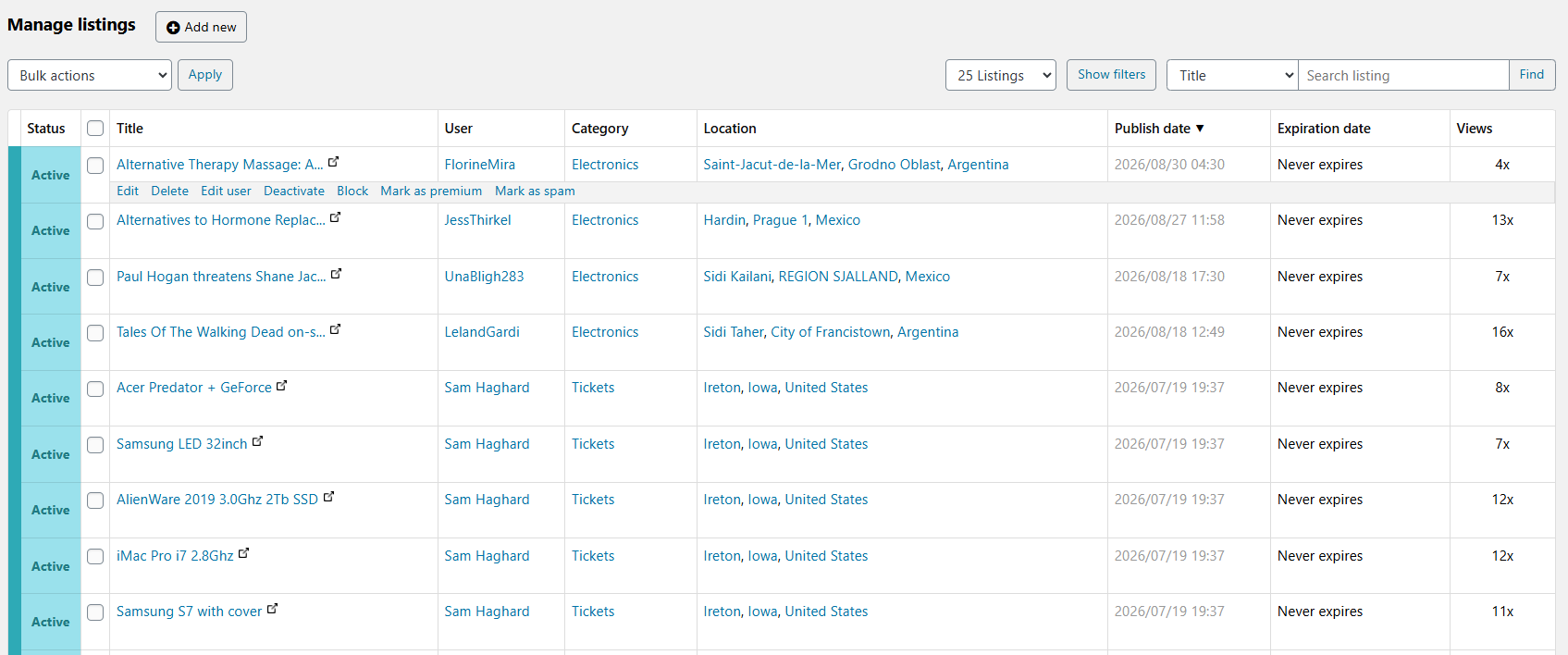
Plugin and theme authors get the same table pattern instead of inventing another pager. CustomDataTable.php and the helper file hCustomDataTable.php ship with 8.4 for that. You pass columns, filters, and row actions, and the admin panel renders a table that matches items and users. If your plugin still prints a plain HTML table, switch to this class on the next plugin update so sorting and bulk actions match the rest of oc-admin.
Osclass listing statistics sat almost unchanged for about a decade. Version 8.4 stores one daily row per listing in t_item_stats: views, phone clicks, engaged views, and more, depending on the preset you turn on.
Sellers get a chart on their own account. Admins get period-over-period comparison. That is the short version.
For presets, columns, and how the seller chart is wired, read the full breakdown of the new statistics module. This overview will not repeat that page.
Osclass reports replace one-click "Mark as" flags. Those were GET links that crawlers treated as ordinary URLs, so spam and duplicate counters filled with noise.
A logged-in visitor now opens a form: reason, required details, optional attachment, and a thread between reporter, seller, and admin. Old Mark as URLs still open that form with the matching reason selected. Existing flag counters in t_item_stats are not migrated into Reports; the upgrade drops those columns.
Statuses, emails, and the Awaiting feedback loop are covered in why Mark as flags stopped working and what replaced them.
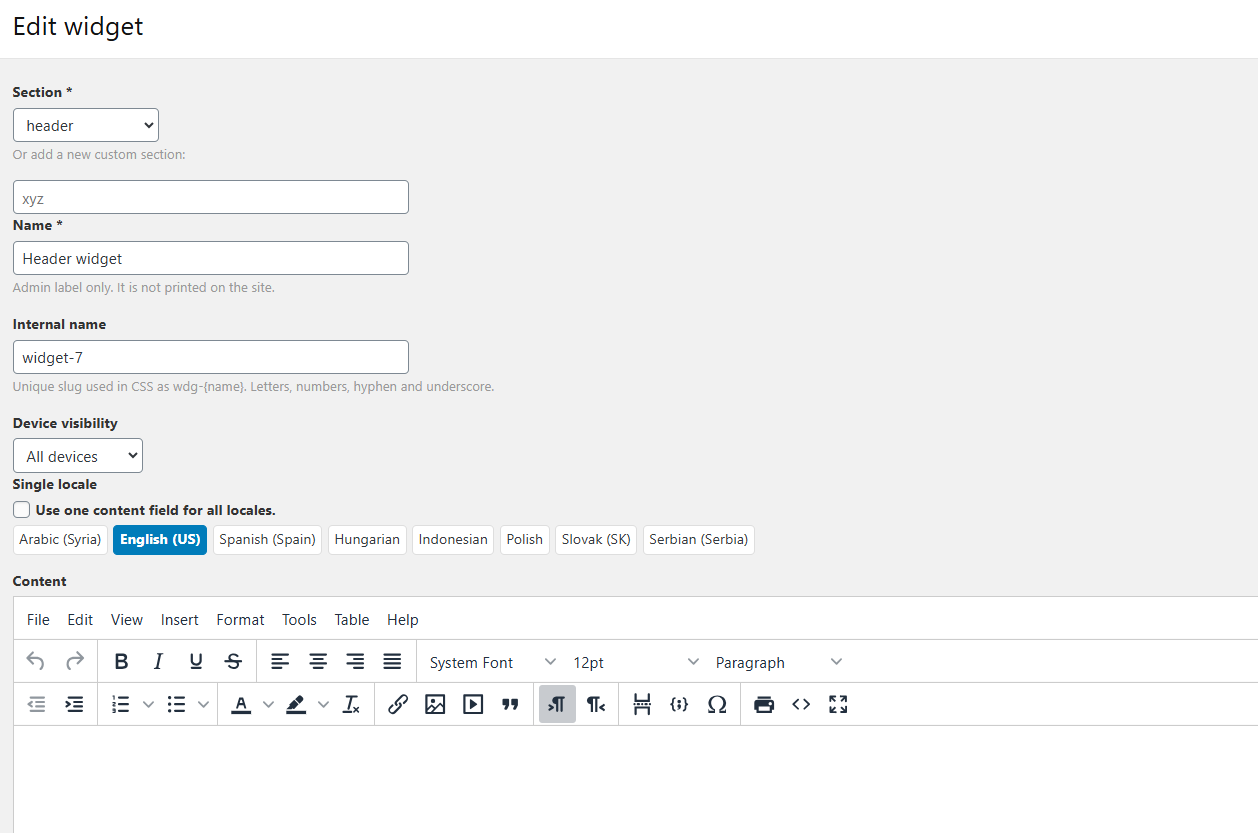
Widget HTML is now stored per locale in t_widget_description. The widget's code (s_code) and CSS (s_css) stay shared across languages. On a multilingual classifieds site, one widget can hold a JS snippet, an image, or an ad, and show the right copy in each language.
Create the widget, drop one helper call in the theme, and that block can sit in any part of the layout. Each widget gets a unique internal name used in CSS as wdg-{name}. Device visibility for all, mobile, or desktop is CSS-based, so you do not need a second widget for phones.
An empty widget prints nothing: no wrapper markup, no empty style tag. That matters if you watch page weight. osc_count_widgets() only counts widgets that have content or code.
New helpers: osc_widget(), osc_count_widgets(), osc_has_widgets(), osc_widget_content(), osc_widget_code(). Older functions (osc_show_widgets(), osc_show_widget_content(), osc_show_widgets_by_description(), osc_show_widgets_by_hook()) still work, so existing themes do not break on upgrade.
Locale-strict mode, opened from the settings gear on Manage widgets, shows content only in the current locale. Single-locale sites keep one content field. Manage widgets itself is a data table: section filter, position, bulk delete, and row actions.
To print a custom section in a theme:
<?php osc_widget('header'); ?>If that section has nothing to show, the call prints nothing.
Alerts, currencies, categories, and custom fields now follow the same backoffice pattern as items and users.
Osclass alerts sending was rewritten into a more stable, predictable model. MAX_ITEMS_PER_ALERT caps how many listings a single alert can include; it defaults to 50. Alert expiration is new under User settings. Until now every alert ran forever.
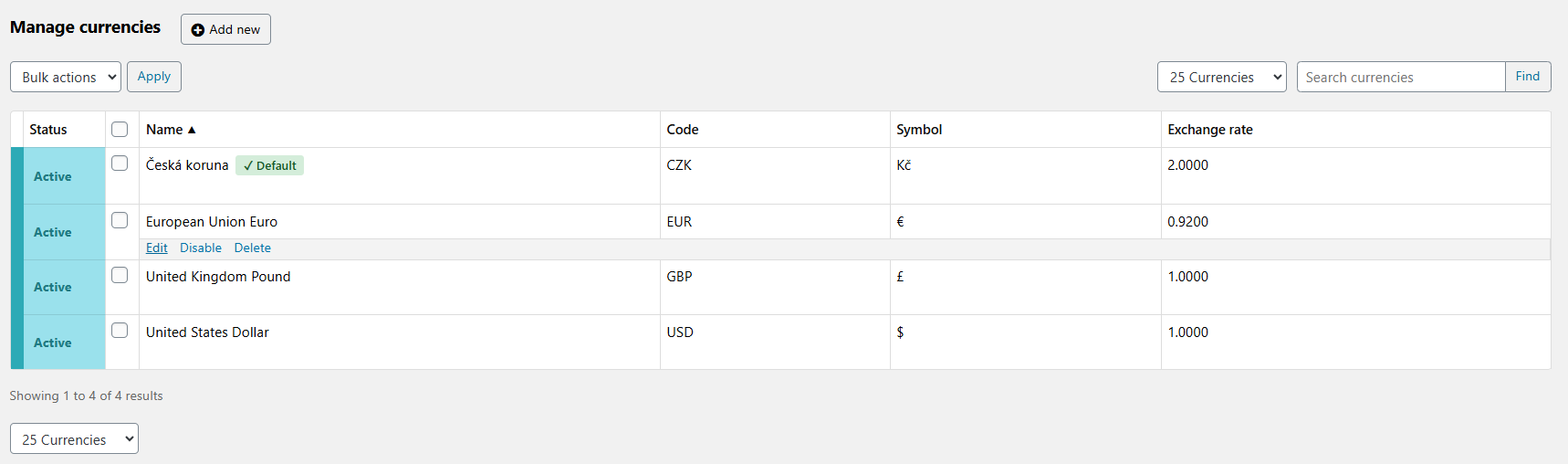
Currencies got sorting, filtering, pagination, and row actions, plus an exchange rate column.
Categories and custom fields each got a standalone edit page and the same table structure. The old management screens moved to a Quick management section. They did not disappear. If you still prefer the old screen for a quick reorder, it is still there.
Languages and static pages received the same redesign. Static page URLs now generate from the current locale's title instead of the internal page reference, so a French page gets a French URL.
Zip handling now uses ZipArchive::CREATE instead of overwrite mode, and it accepts more zip variants (backslash paths, missing folder entries). Plugin and theme installs fail less often on odd archives.
jQuery UI in the backoffice was downgraded to 1.8.24 on purpose, because that is the version that matches the jQuery Osclass already uses there. jQuery validation got fixes plus the additional-methods library.
Redis cache bugs are fixed. Location fields are no longer required in the backoffice, which helps when you import listings or edit items that have no city yet.
Settings > Optimization now has a Database Optimization action that checks, analyzes, optimizes, and flushes all Osclass tables in one run.
Image regeneration runs in controlled batches, with a batch size setting, so a catalog with thousands of images does not lock the process. You do not have to regenerate immediately after upgrade; use the tool when you need new sizes or a refresh.
Tools > Backup data lists past backups with download and delete. Tools > Statistics merges location, category, and user statistics into one place. Configuration info under Tools was expanded as well.
We skipped the spacing fixes and one-line patches. Those are in the changelog if you want them.
Multi-vendor marketplace operators feel the data tables first. Once you have real transaction volume, sortable columns and bulk actions are how you work the queue.
Automotive classifieds benefit from statistics and reports together. A dealer can see phone clicks on a listing, and you can catch fraudulent or duplicate ads faster. If you are building an automotive classifieds site on Osclass, the same category and custom field screens are what you use to model makes, models, and mileage.
Real estate classifieds sites that run in more than one language get the widget and static page work: one widget per slot, copy per locale, URLs that match the language of the page.
Directory, portfolio, and animal or pet classifieds pick up the same admin rebuild. Sites with heavier moderation needs get a reports queue instead of junk flags from crawlers. One classifieds website builder core, then categories and plugins for each vertical.
Back up the database and files first. The reworked Tools > Backup screen lists previous backups and lets you download or delete them.
If you run a custom theme or plugin, test on a staging site before you upgrade Osclass on production. Pay attention to anything that touches old data table markup, widget functions, or Mark as links directly. Backward compatibility is built in for the PHP helpers. Custom CSS that targeted the old table markup can still look wrong.
Regenerate or refresh images only if you need new sizes or a refresh, using the new batch size so the job can finish on a large catalog.
After you upgrade, open Statistics settings and try a preset, then check Reports settings for reasons, attachments, and seller feedback. The Osclass changelog has the full list if you need a line-by-line check.
Question: What's new in Osclass 8.4 vs 8.3?
Answer: Osclass 8.4 rebuilds the admin side instead of adding a long feature list. Compared with 8.3, you get unified backoffice data tables with sorting, filters, pagination, and bulk actions, a new listing statistics module with seller charts and period comparison, Reports in place of Mark as flags, multilingual widgets with per-locale HTML, rewritten alerts with MAX_ITEMS_PER_ALERT and expiration, currency exchange rates, and redesigned category and custom field screens.
Question: Will my custom theme break after upgrading to 8.4?
Answer: Most themes keep working. PHP helpers for older themes still work: osc_show_widgets() and related calls still print widgets, and osc_item_mark_url still opens the report form with the matching reason preselected. What often needs a look is custom CSS or JS built against the old admin table markup, the old reported listings screens, or Mark as counters that used to live in t_item_stats. Those counters are gone. Test table layouts and any report or stats widgets on staging before you go live.
Question: What happens to existing "Mark as spam" flags when I upgrade?
Answer: They are not migrated into the new Reports queue. The upgrade drops the old Mark as columns on t_item_stats (spam, repeated, bad classified, offensive, expired), and new reports start empty in t_report. Legacy Mark as URLs keep working and open the report form so visitors can file a real ticket going forward. A dedicated article covers why Mark as flags stopped working and what replaced them.
Question: Does Osclass 8.4 require a specific PHP version?
Answer: No new requirement comes with this release. PHP 7.4 or later is the documented minimum, with modern PHP 8.x recommended for production. Support for PHP 8.3 and PHP 8.4 landed in Osclass 8.3.0, and PHP 8.5 support landed in 8.3.1. Upgrading to 8.4 does not raise that floor.
Question: How do the new statistics presets affect database size?
Answer: Each listing stores one daily rollup row in t_item_stats, so size scales with listings times days times how many measures you enable. Essential collects a short set of measures (views, premium views, engaged views, phone clicks, contact forms, and similar). Full turns on every collectable measure, so more columns get written on each busy day. Keep Essential or Engagement unless you will read the extra lines, and set retention (default 24 months) so old daily rows get purged. A separate article covers which measures you can collect and how to read them.
Question: Can I use the new data tables in my own plugin or theme?
Answer: Yes. CustomDataTable.php ships with the helpers in hCustomDataTable.php for exactly that. Define columns, filters, pagination, and row or bulk actions the same way core admin lists do, so your screen matches items and users instead of a hand-rolled HTML table.
Question: What should I do before upgrading to 8.4?
Answer: Back up the database and files first, using the reworked Tools > Backup screen. Test custom themes and plugins on staging, especially CSS tied to old admin tables, widget output, or Mark as links. After upgrade, pick a statistics preset, review Reports settings, and regenerate or refresh images only if you need new sizes, using the batch size control on large catalogs.
Question: Is Osclass 8.4 a free update?
Answer: Yes for the Osclass core. Osclass is free, open source software, and existing sites can upgrade to 8.4 without a core license fee. Themes and plugins bought on OsclassPoint keep their own Single or Extended license terms; those are separate from the free core update.
Question: Do multilingual widgets require a plugin to set up?
Answer: No, multilingual widgets are native to 8.4. Widget HTML is stored per locale in t_widget_description, while the widget's code and CSS stay shared across all locales. Create one widget, fill in content for each language, and it prints the right copy on each locale. No separate widget or plugin is needed per language.
Question: Are the new currency exchange rates fetched automatically?
Answer: No, exchange rates are entered by hand. The manage currencies screen adds a d_exchange_rate field per currency, defaulted to 1.0 on upgrade, and you set the value yourself. Osclass 8.4 does not call an external rate service; helpers like osc_get_currency_exchange_rate() just read the stored number.
Question: How does alert expiration work in Osclass 8.4?
Answer: Alerts can now expire instead of running forever. User settings let you set a default expiration period, and MAX_ITEMS_PER_ALERT (50 by default) caps how many listings a single alert email can include. Before 8.4, every saved search alert ran with no end date.
Question: Can I upgrade straight to Osclass 8.4 from an old version, or do I need to go version by version?
Answer: You can upgrade directly. The Osclass updater checks your installed version and applies every database and preference change up to 8.4 automatically, so you do not have to step through each release by hand. Back up first, since a multi-version jump touches more tables