

Osclass Themes and Osclass Plugins

WebP Images Generator Plugin

Plugin
Demo available
Updated recently
WebP Images Generator Plugin - SEO, Speed & Admin - Osclass plugins
Downloads 967
Rating 5.0 (6)
Version 1.2.1
Osclass version 3.0 or higher
Last update Sep 2026
No. updates 10
  • Details Product details
  • Reviews 6
  • FAQ
  • Changelog
  • Support

Would you like to optimize images on your classifieds and use image format of 21st century? WebP Generator Plugin for Osclass classifieds helps you to optimize size of your images, improve loading speed of your site for customers and defacto improves user experience.

WebP Images Generator for Osclass

WebP Images Plugin simply takes every listing image on your classifieds and create it's ".webp" version.

This conversion works for JPG, JPEG, PNG and GIF listing images. Admin can select:

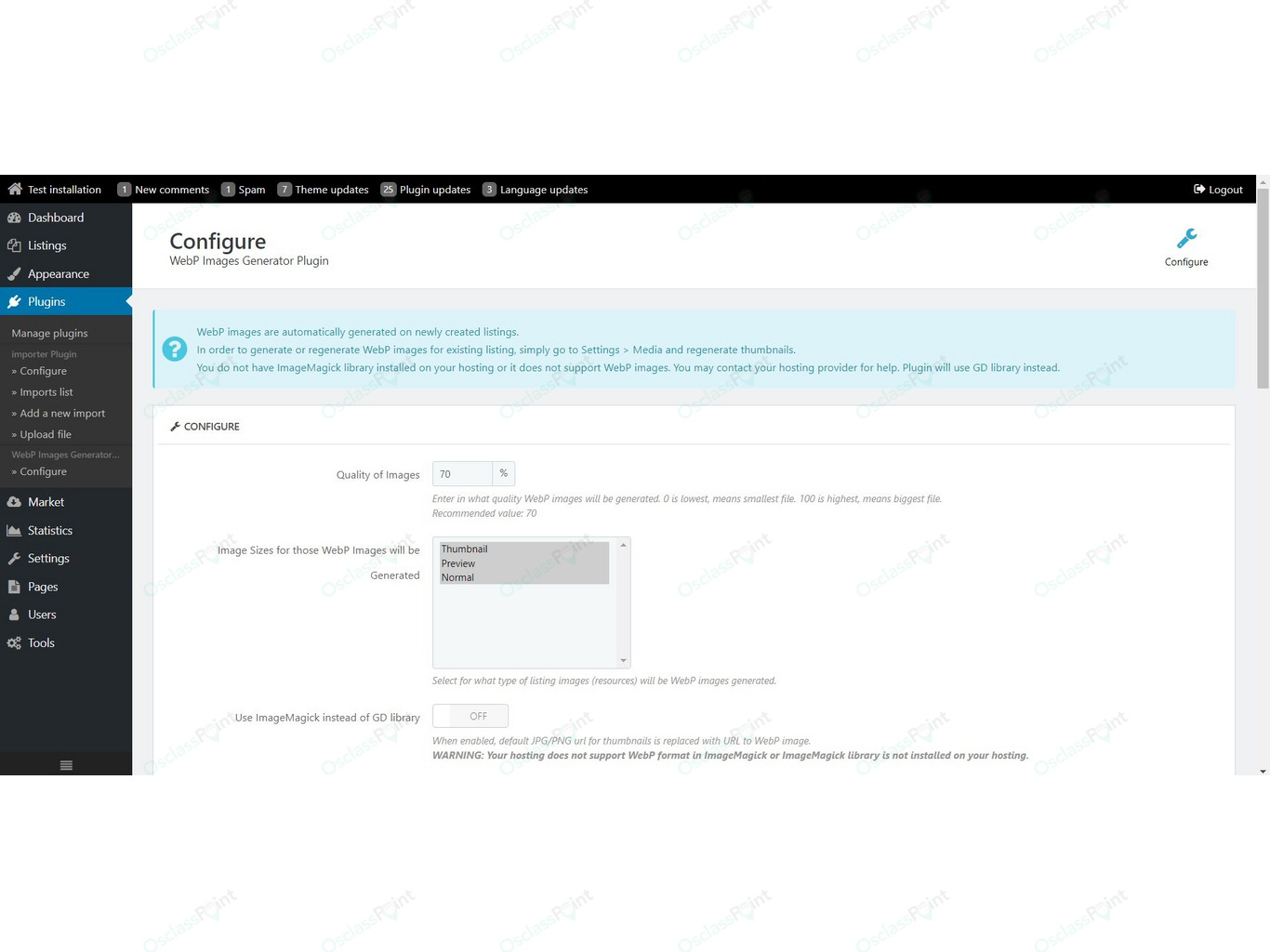
  • Quality of WebP images (0 - 100)
  • Engine used to generate WebP images (GD library by default - imagewebp function must exists, or ImageMagick if available)
  • Type of images for those WebP format will be generated (thumbnail, preview, normal sizes)

Installation and setup

Initial installation is super easy. Once you've installed plugin, go to Configuration page of plugin, select quality, types of images, ... and save.

  • New listings - WebP images are automatically generated on publish
  • Existing listings - go to Settings > Media and simply regenerate your thumbnails. As this may be extensive process on large classifieds, we recommend to use latest version of Osclass that allows sequential images regeneration.

Plugin also allows to modify image URLs without need to modify single line of code. You can automatically replace:

  • thumbnail images
  • preview images
  • normal images

How it works? Plugin use "filter" for resource URLs and change extension. Using only WebP images in theory may cause problems to customers using legacy/old browsers.

Reduce your server cost and increase scalability with S3 Image Cloud Storage Plugin!

Advanced integration for legacy browsers

In order to provide full support to legacy browsers, plugin contains functions those generates new HTML tags using "picture" and "srcset".

<?php echo wbp_thumbnail_resource_tag()); ?>

Alternativelly, it is possible to use only functions to get ".webp" image url:

<?php echo wbp_replace_extension($link); ?>

What is WebP image and its benefits

WebP is a modern image format that provides superior lossless and lossy compression for images on the web. Using WebP, webmasters and web developers can create smaller, richer images that make the web faster.

WebP lossless images are 26% smaller in size compared to PNGs. WebP lossy images are 25-34% smaller than comparable JPEG images at equivalent SSIM quality index.

Lossless WebP supports transparency (also known as alpha channel) at a cost of just 22% additional bytes. For cases when lossy RGB compression is acceptable, lossy WebP also supports transparency, typically providing 3× smaller file sizes compared to PNG.

Compatibility with other optimization plugins

This plugin is compatible & synergize with other plugins focusing on page speed optimization:


Note: If you are looking for legacy browsers setup, we recommend this plugin to advanced users only.

Note: Plugin require PHP 7.2 or higher and function imagewebp must exitst on your installation. Check it with your hosting provider before purchase!

For theme integration questions, please use support forums.

Image formats are part of our Core Web Vitals guide.

Last update of product description has been on 18. September 2026

Product features and functionality

Basic documentation included
Require theme modifications
Require PHP skills
Add front office functionality
Use hooks for theme integration
Coding skills recommended
Recommended for advanced osclass users
No dependency on 3rd party services
Osclass Seller's picture
MB Themes
Premium developer
225 products
View seller profile

Product support includes

Product license never expires, download and use it anytime, even after support ends
12 months access to support and latest updates
Support can be extended anytime for 35% of base price (+12 months)
Availability of seller to answer questions
Answer technical queries about product features
Assistance with reported bugs or issues
Help with installation in case there is problem
Product in English language (other locales provided by community)
Proven support scale: 9,200 resolved tickets and 47,000 support messages
Long-term maintenance track record: 2,200+ updates released across products
Updates are based on customer support cases, Osclass core changes, PHP/MySQL updates, and real-world usage feedback

Support does not include

Customization service, custom work or feature requests
Support on free/gratis plugins delivered with premium themes
Installation service
Translation and localization services

Support quality, trust and engineering proof

Seller updated this product 10 times
Seller rating is 4.6 of 5 - Excellent (597 reviews)
Average response time to support tickets is 1 hour 24 mins
Member since 2017

Support available in:

English English
English Czech
English Slovak
This product is not compatible with WordPress. All our themes and plugins work exclusively with Osclass.

Frequently asked questions

Question: What does WebP Images Generator Plugin do in a real classifieds workflow?

Answer: It creates WebP copies of listing photos (thumbnail, preview, and normal sizes) so search and listing pages can serve smaller files than JPG, PNG, or GIF. New listings get WebP files on upload. Existing listings are converted when you regenerate thumbnails in Settings > Media.

Question: Which type of marketplace benefits most from WebP Images Generator Plugin?

Answer: Sites with many listing photos: cars, real estate, fashion, and similar. Those pages load faster when image files are smaller, especially on mobile.

Question: What should be configured first after installing WebP Images Generator Plugin?

Answer: Confirm the host has GD or ImageMagick with WebP support. Set quality (70 is the recommended start), pick which listing sizes to convert, then save. Enable Replace Thumbnail, Preview, or Default URL only after you check listing photos in a current browser. Keep Remove Original Image off until you know Settings > Media still stores originals you can regenerate from.

Question: Does WebP Images Generator Plugin work with Blog Plugin?

Answer: Yes. When both plugins are enabled, Blog article covers and author photos are converted on upload. Images in article text are converted when Replace Plugin HTML Images is enabled. Only images hosted on your site are converted. Off-site image links stay as they are.

Question: Do I need Blog Plugin for WebP Images Generator Plugin to work?

Answer: No. WebP Images Generator Plugin converts listing photos on its own. Blog Plugin also works without it and keeps original covers, author photos, and article images. Plugin Images settings and the generate button appear only when a plugin such as Blog registers image folders.

Question: How do I convert existing Blog images to WebP?

Answer: Open WebP Images Generator Plugin settings and use Generate WebP for plugin images. That converts existing Blog article covers, author photos, and (when Replace Plugin HTML Images is enabled) images already stored in article text. New Blog uploads convert automatically after that.

Question: Is WebP Images Generator Plugin compatible with recent Osclass and PHP versions?

Answer: Yes. It is built for current Osclass 8 sites and PHP 7.2 through 8.5. After an Osclass or PHP upgrade, open a listing with photos and, if Blog is installed, open one article with a cover and an in-text image.

Question: How can performance impact be tested for WebP Images Generator Plugin?

Answer: Compare listing and search page load with photos before and after you enable URL replace. Conversion runs on upload or regenerate, not on every page view once the WebP file exists. Generate WEBP image if missing can add a short delay on the first view of an old photo. Do not enable Remove Original Image while you are still testing sizes.

Question: How can problems with WebP Images Generator Plugin be diagnosed quickly?

Answer: If no WebP files appear, the host likely lacks GD or ImageMagick with WebP. If photos disappear in old browsers, turn off URL replace or keep originals. If you cannot regenerate listing thumbnails, originals were removed. For Blog, confirm both plugins are enabled, then check covers, author photos, and article text separately.

Question: How should updates of WebP Images Generator Plugin be handled safely?

Answer: Update on a copy of the site first. Check a new listing upload, an existing listing after Media regenerate, and one Blog article (cover, author photo, in-text image) if Blog is installed. Keep a backup of oc-content/uploads before you use Remove Original Image or Remove WebP Images.

Question: Does WebP Images Generator Plugin require ongoing manual maintenance after setup?

Answer: No. New listing and Blog images convert on upload. You only need a one-time regenerate for photos that already existed: Settings > Media for listings, and Generate WebP for plugin images for Blog files.

Question: Does WebP Images Generator Plugin replace S3 Image Cloud Storage Plugin?

Answer: No. It creates WebP files on the site. If S3 Image Cloud Storage Plugin is also installed, new WebP files can be synced to the bucket. Use S3 for remote storage. Use WebP Images Generator Plugin for WebP copies.

Changelog - Product updates history

Version 1.2.1 released on 2026-09-18

  • Converts Blog cover photos and author photos to WebP on upload when the Blog plugin is installed.
  • Optional setting converts images inside article text. Only images hosted on this site are changed.
  • Generate WebP copies for existing blog articles from plugin settings.
  • Removing WebP files now includes blog images as well.

Version 1.1.5 released on 2026-05-21

  • Improved compatibility with future versions of Osclass.
  • Fixed minor issues.

Version 1.1.4 released on 2026-03-05

  • Fixed incompatiblity of Webp and S3 storage plugins.

Version 1.1.3 released on 2025-10-02

  • Plugin now support option to remove original (jpg/png/gif) image once webp image has been generated.
  • Use with care, test well before using in production!
  • This setting has no impact on existing images.

Version 1.1.2 released on 2023-03-30

  • Fixed issues when using plugin with S3 service (or external/remote image storage)

Version 1.1.1 released on 2023-03-14

  • Minor improvements with generator and missing webp images.

Version 1.1.0 released on 2023-03-13

  • Major update: Redesigned conversion functions and isolated them to be able to use webp conversion on other places as well.
  • Created 2 new functions for those that would like to get webp on other images:
  • - Covert standard image to WEBP variant - wbp_image_to_webp($source_img_path, $target_img_path = "")
  • .
  • - Get WEBP url of standard image. If does not exists, generate WEBP image - wbp_get_webp_img($source_url, $generate_if_missing = true, $generate_force = false)
  • .

Version 1.0.2 released on 2022-12-12

  • Fixed bug that could cause that ImageMagick library was not available in plugin, but actually it should be available.

Version 1.0.1 released on 2021-11-24

  • Fixed possible issues those might be caused by Imagick library

Version 1.0.0 released on 2021-11-05

  • Initial plugin release

View all products updates

Product rating: 5.0 - Excellent, based on 6 reviews

Verified & Genuine Reviews

All reviews on OsclassPoint come from real customers who have purchased the product. Only verified buyers can leave a rating or review.

To maintain quality and accuracy, every review is moderated before being published.

Thank you very much by warir rachid on 21. Oct 2024

5.0 - Excellent
It works well. All the plugin I purchased work well. Thank you.

Working as expected by Ivan on 15. Apr 2022

5.0 - Excellent
Great plugin! Big tkx for our crazzy lovely developer of osclass ) Good staff that new core can regenerate photos as much as you want ! smile I was able to regenerate 40.000 images, it took time, but anyhow with success ! ) Thanks again and good luck!
Osclass Seller's picture

MB Themes response:

Glad to hear plugin is helpful to you! Good luck wink

great plugin by Michael on 3. Dec 2021

5.0 - Excellent
great plugin, improves page loading, thanks
Osclass Seller's picture

MB Themes response:

Thanks for review, glad ro hear your classifieds is faster smile

Speeds up your website by Marc Windey on 17. Nov 2021

5.0 - Excellent
This plugin speeds up loading time and leaves competitors far behind... Easy to install and configure. Great work!
Osclass Seller's picture

MB Themes response:

Thank you Marc, appreciate your feedback and support!

All perfect by Mario on 12. Nov 2021

5.0 - Excellent
All perfect, how could i convert blog images?
Osclass Seller's picture

MB Themes response:

Hi Mario, blog plugin content is currently not covered by this plugin.

A very useful plugin by salesnsoft on 8. Nov 2021

5.0 - Excellent
It speeds up full page loading and image compression and conversion to a modern web format is fast. Another good job by OsclassPoint. smile Thanks a lot!
Osclass Seller's picture

MB Themes response:

Thanks so much for your feedback, optimization should be topic #1 smile
View license details
33.99
5.0 - Excellent Based on 6 customer reviews
Created by best developers
Regular updates and bug fixes
Premium support services
Top rated product
Add to cart ✨ Ask Fred – AI Support Agent Contact seller Online · Replies within 1 hour
Price is in Euros
Osclass Seller's picture
MB Themes
12 years building for Osclass, focused on performance tuning, payment integrations, and marketplace SEO. 2,200+ product updates shipped, 9,200 support tickets closed along the way. See verified customer reviews on Trustpilot

Product technical details

967 downloads
10 updates
18445 views
Product version: 1.2.1
Last update: 5 hours ago
Osclass support: 3.0 or higher Download osclass
Product rating: 5 of 5 - Excellent
Published on: 5. Nov 2021
Folder name: webp_images