



The Google Merchant Feed Plugin for Osclass allows you to quickly and easily generate a valid XML feed for Google Merchant Center directly from your Osclass listings. This plugin is designed to simplify the process of connecting your Osclass store with Google Merchant Center so you can efficiently promote and manage your products on Google Shopping.
Plugin can process up to several thousands of items into XML file. Maximum amount of items depends on your server performance, but generally limit is between 10-50 thousands of listings.
Once installed, the plugin generates two types of XML feeds in your Osclass root folder: a Products Feed and a Reviews Feed. The Products Feed contains all the information about your listings, including titles, descriptions, images, prices, and additional details. The Reviews Feed exports comments and reviews associated with your items, ensuring that both feeds are fully compatible and only include valid items.
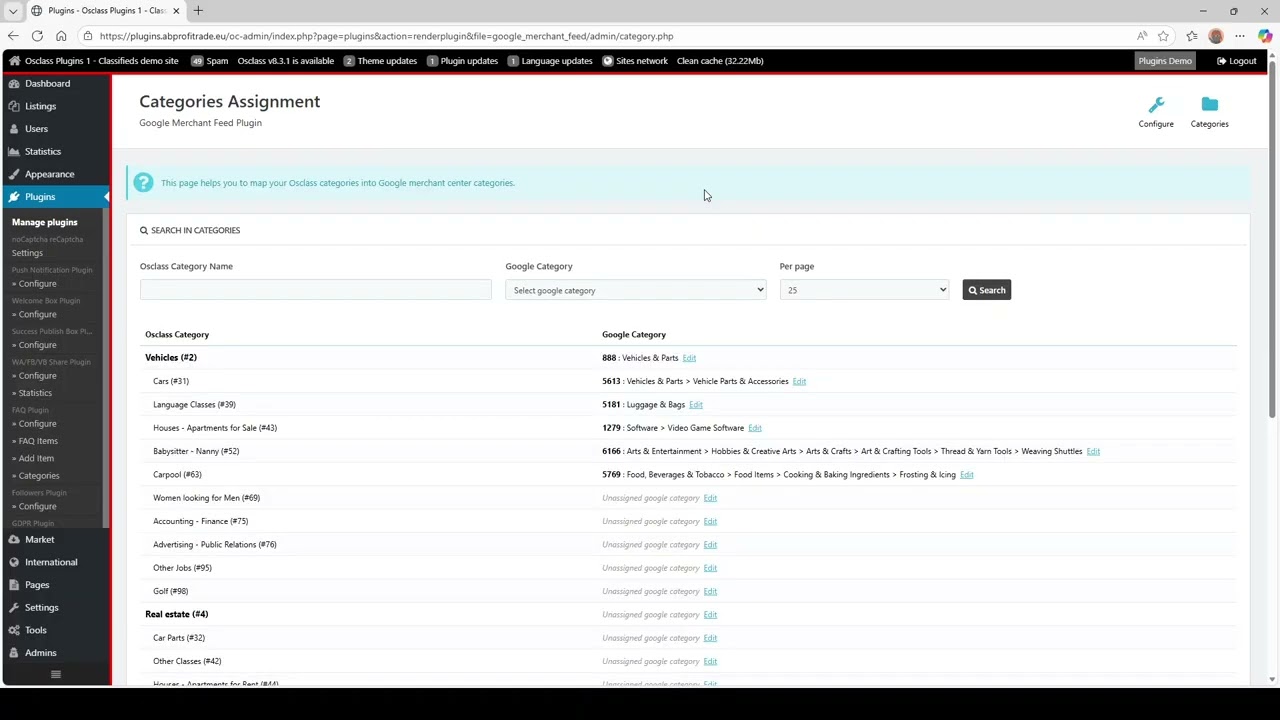
Categories Assignment
A key feature of the plugin is its category mapping system. You can map your Osclass categories to the corresponding Google Merchant Center categories using the Categories Assignment page. This ensures that your products are properly categorized when imported into Google Merchant Center.
You can search through your categories, assign a Google category to each Osclass category, and edit assignments at any time. Proper category assignment improves product visibility and ensures your feed meets Google’s requirements.
Configure Options
Plugin has many options to customize various aspects of the feed generation process:
- Set a Default Google Category to be used when a category is not assigned.
- Enable Automatic Generation by Cron to refresh XML files daily without manual intervention.
- Choose between Inputs or Select Boxes for category mapping. Inputs offer a faster setup, while select boxes provide a more detailed selection interface.
- Set the Feed Title and Feed Description that will appear in the XML file. Leaving these blank will use your Osclass page title and description automatically.
- Specify the Reviews Publisher, or leave it blank to default to "Osclass".
- Define a Default Item Condition (new, used, refurbished) to include in the feed.
- Add a SKU Prefix for your items. If none is specified, the default "OSC" prefix is used.
- Use the item Contact Name as Brand, or set a Default Brand for all listings.
Feed Filters and Locale Options
The plugin includes flexible filters to control which items appear in the feeds. You can filter items by category, country, price, or inclusion of images. Items with a price of zero or marked as “check with seller” can be optionally included, and listings without images can also be added using a default image.
You can select a preferred locale to define which language and format are used for item titles, descriptions, and URLs in the feed.
Conclusion
With the Google Merchant Feed Plugin, Osclass site owners can automate the creation of feeds that are fully compatible with Google Merchant Center. It removes the need for manual feed creation and updates, saving time and reducing the risk of errors. By mapping categories correctly and defining default settings for items and reviews, you can ensure your listings are displayed accurately on Google Shopping.
The plugin is simple to configure, yet flexible enough to meet the needs of stores with diverse product ranges. It supports both items and their associated reviews, ensuring your feed is comprehensive. Automatic daily updates via cron mean your feed remains current without additional effort.
Whether you manage a small Osclass store or a large marketplace, the Google Merchant Feed Plugin makes it easier to reach a wider audience through Google Shopping. By generating properly formatted feeds and allowing full control over categories, conditions, brands, and locales, this plugin ensures your products are presented professionally and accurately to potential customers.

 English
 Czech
Czech Slovak






Verified & Genuine Reviews
All reviews on OsclassPoint come from real customers who have purchased the product. Only verified buyers can leave a rating or review.
To maintain quality and accuracy, every review is moderated before being published.