



Payouts Plugin helps you turn Osclass Pay eCommerce orders into clean, manageable payout batches for your sellers. It is designed for marketplaces that need a clear workflow: see what is ready to be paid, create a payout, review it, remove incorrect lines, add payment references, mark items as paid, and keep everything organized in one place.
Payouts plugin require Osclass Pay Plugin v3.8 or higher to be installed with eCommerce features enabled.
The plugin extends Osclass Pay and works with the existing payment/order data. Payouts are created as a snapshot, so you can safely review and adjust the payout content without changing the original order history.
What you can do with Payouts Plugin
- Create automatic payouts for all eligible orders (regular payout cycle).
- Create custom payouts for a selected date range (ideal for corrections, missing periods, manual processing).
- Create custom payout for one seller only by entering User ID (optional filter).
- Review payout details with clear seller totals (sales, commission, payout, remaining).
- Remove incorrect orders from a payout (single line removal).
- Remove all orders of a seller from a payout in one click (seller-level removal) 🧹.
- Set payout reference per order (and quickly apply the same reference to all orders of one seller).
- Mark orders as paid (also in bulk per seller) and keep payout status in sync.
Backoffice Features
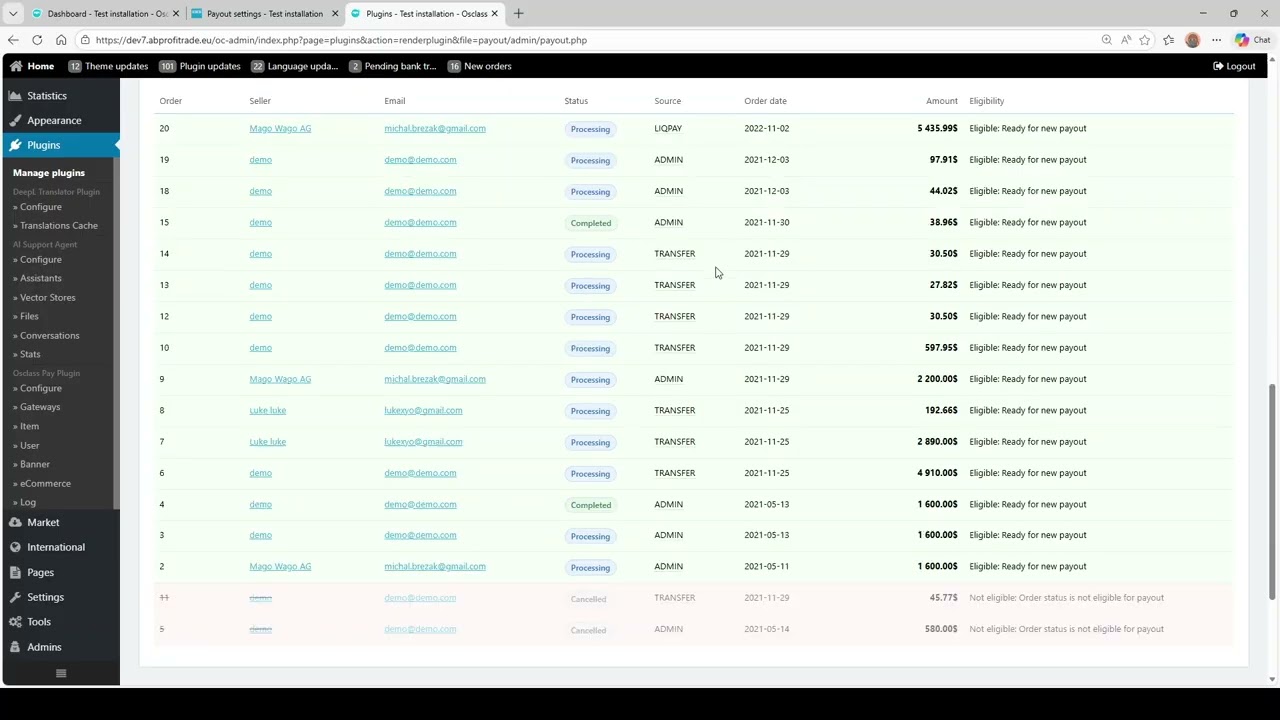
The Payouts page allows you to check upcoming eligible orders. You can create automatic payouts including all eligible orders based on your plugin rules or build custom payouts by selecting a date range and optionally filtering by User ID for a single seller. Payouts can be reviewed with clear seller breakdowns and order lines. You can remove single orders or all orders for a seller if needed, add payment references, and mark orders as paid. All changes update the payout status automatically.
Seller Payout Accounts
Sellers can manage their payout details (bank transfer, PayPal, or custom method). The payout overview displays account info alongside totals, saving time and reducing errors.
Eligibility Rules & Transparency
Only orders matching your criteria (status, source, defer days, minimum amounts) are included. The backoffice shows which orders are eligible and explains why others are excluded.
Notifications
Admins and sellers can be notified when a payout is created using Osclass email templates, reducing support questions like “when will I be paid?”
Benefits
- Fast overview of totals per seller and per payout.
- Safe corrections without altering original orders.
- Bulk actions: references and paid flags per seller.
- Custom payouts per user ID for flexibility.
- Clean, practical backoffice interface for daily use.

 English
 Czech
Czech Slovak





Verified & Genuine Reviews
All reviews on OsclassPoint come from real customers who have purchased the product. Only verified buyers can leave a rating or review.
To maintain quality and accuracy, every review is moderated before being published.