


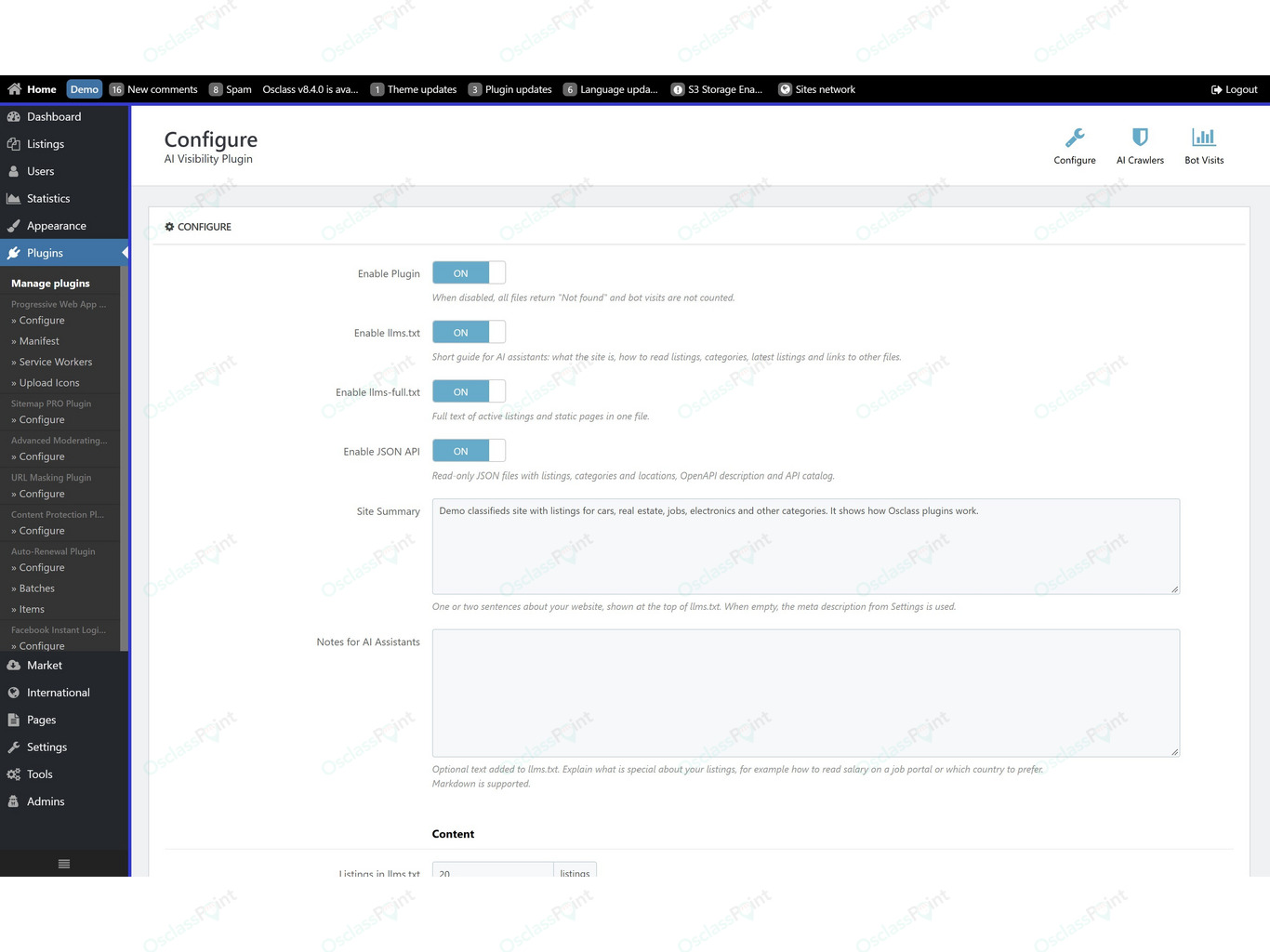
More people now ask ChatGPT, Claude or Perplexity where to buy a used car, rent a flat or find a job. AI Visibility Plugin is an Osclass plugin that publishes your listings in the formats AI assistants read: llms.txt, JSON feeds and an OpenAPI description. It also lets you allow or block AI crawlers in robots.txt and shows which AI bots visit your site.
No theme changes are needed. After installation the files are live at the standard addresses AI bots check first.
What does AI Visibility Plugin do?
It gives AI assistants and agents a current, structured copy of your classifieds, so they can cite your listings and link back to them. In short, the plugin:
- Publishes files for AI - llms.txt, llms-full.txt, JSON listings, categories and locations, OpenAPI and an API catalog
- Controls AI crawlers - separate rules for AI search bots and AI training bots, written to robots.txt
- Tracks AI bot visits - which bots came, when, and what they opened
- Protects private data - emails, phone numbers and user accounts are never published
Which files does the plugin create?
The plugin creates seven read-only files from the listings visitors can see on your site:
| File | What it contains |
|---|---|
| /llms.txt | Guide for AI assistants: what your site is, how to read prices and expiration dates, categories with listing counts, latest listings and links to the other files |
| /llms-full.txt | Full text of your latest listings and public static pages in one file |
| /api/v1/listings.json | Listings with title, URL, description, category, location, price, seller name, dates, main image and custom fields |
| /api/v1/categories.json | Category tree with the number of active listings |
| /api/v1/locations.json | Countries, regions and cities that have active listings |
| /openapi.json | OpenAPI description of the JSON files, so AI agents know how to query them |
| /.well-known/api-catalog | API catalog (RFC 9727) that points bots to the files above |
Every page of your site also links to llms.txt and the API catalog in the page head, so bots find the files from any page they land on.
Add your own notes for AI assistants
You can add a short site summary and your own notes to llms.txt. Use them to explain what is specific to your listings. A job portal can say how salary is shown or which country to prefer. A car site can explain what its custom fields mean.
How do I allow or block AI crawlers?
Choose a rule for each of the two bot groups on the AI Crawlers page, and the plugin writes them to robots.txt:
- Search and assistant crawlers - OAI-SearchBot, ChatGPT-User, Claude-SearchBot, Claude-User, PerplexityBot, Perplexity-User, DuckAssistBot, MistralAI-User and others. They fetch pages to answer user questions and usually link to the source.
- Training crawlers - GPTBot, ClaudeBot, Google-Extended, Applebot-Extended, CCBot, Bytespider, meta-externalagent and others. They collect content to train AI models.
A common setup is to allow search crawlers, so your listings can appear in AI answers, and block training crawlers. Your existing robots.txt rules stay as they are, and you can remove the plugin rules with one click.
- Content signals - adds a Content-Signal line that says whether your content may be used for search, AI answers and AI training
- Deny access to blocked bots - some bots ignore robots.txt. With this option on, bots you block get a 403 error on every page, based on their user agent.
How can I see which AI bots visit my site?
Open the Bot Visits page. It shows a 30-day summary for each AI bot and a daily list of what each bot opened: listing pages, search results, llms.txt or the JSON files. You can filter by bot, page and date. Blocked visits are counted too, so you can check that your rules work.
Only the bot name, the page type and the number of visits are stored. No IP addresses or other personal data.
Which data is published and which stays private?
The files contain only public listing data. The details:
- Listings are included only when visitors can see them on your site. Spam, blocked, inactive and expired listings are left out.
- Emails, phone numbers and user accounts are never published. Email, phone and file custom fields are skipped.
- Seller name, custom fields, main image and static pages can each be switched off.
- You can exclude categories. Their subcategories are excluded too.
Does it work on multilingual sites?
Yes. When the language code is part of your URLs, each language has its own files, for example /de/llms.txt or /sk/api/v1/listings.json, with titles, categories and links in that language. Without language codes in URLs, the files use your default language. llms.txt also lists every language version of your site.
Will it slow down my site?
No. A file is generated only when someone opens it and is then cached, for 60 minutes by default. Repeated requests get a short "not modified" answer instead of the whole file. Regular pages only get two small links in the page head. You can clear the cache anytime in the plugin settings.
Want better results in classic search engines too? Combine it with All-in-One SEO Plugin for meta titles, descriptions and sitemaps.
How to install and set up
- Install the plugin. All files work right away with the default settings.
- Configure your site summary and notes for AI, then choose how many listings each file contains and what to include.
- AI Crawlers: choose which bot groups to allow and save. The rules are written to robots.txt.
- Bot Visits: check back after a few days to see which AI bots read your site.
Note: AI services decide on their own what they show in their answers. The plugin makes your listings easy to find and read, but no plugin can guarantee a place in an answer.
Note: Plugin requires PHP 7.2 or higher and friendly URLs enabled in Settings > Permalinks. Tested with Osclass 8.4. To update robots.txt automatically, the file must be writable; otherwise copy the generated rules into it. If you use Cloudflare or a similar service, check that it does not replace your robots.txt.
For theme integration questions, please use support forums.

 English
 Czech
 Slovak





Verified & Genuine Reviews
All reviews on OsclassPoint come from real customers who have purchased the product. Only verified buyers can leave a rating or review.
To maintain quality and accuracy, every review is moderated before being published.