

Almost every classifieds script says it can handle millions of listings. You see this sentence on landing pages, in sales chats and in comparison posts. It may be true on a strong server with good settings. But it does not tell you what you need to know before you spend money: which part gets slow first, when it happens, and what you can do about it. If you plan your own classifieds or marketplace site, this question matters more than the feature list.
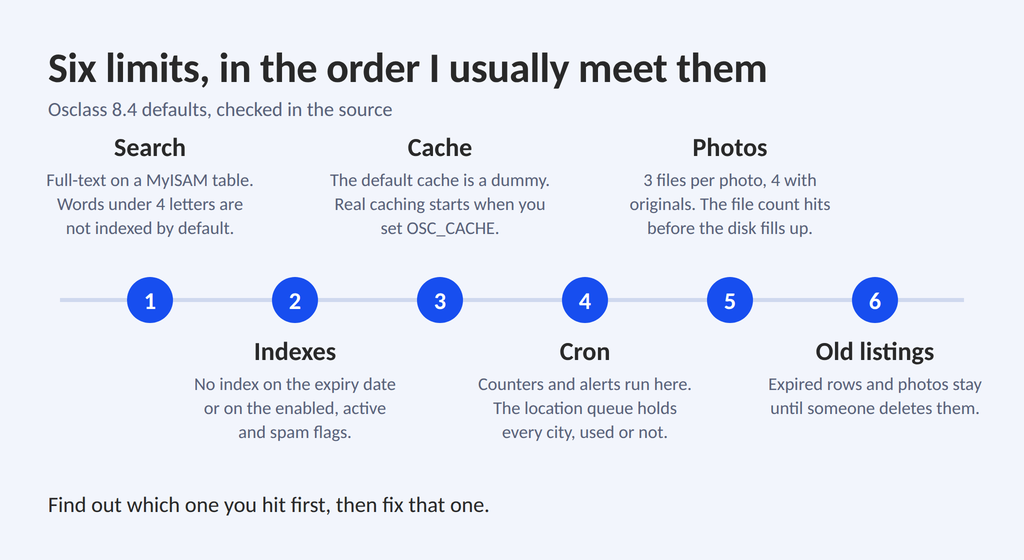
Short answer: there is no safe number of listings. In Osclass 8.4 the limit comes from keyword search, a few missing database indexes, a cache that is off by default, cron jobs, photo files and old listings that nobody deletes. Find out which one you hit first and you can move the limit a lot, often without changing the script.
I build and maintain classifieds websites with Osclass, and I read its code and database every week. On a client project I imported around 100,000 listings into a live site in about two days, and the front office stayed fast. For this article I checked every technical point below against the source code of Osclass 8.4 (version 8.4.0) in October 2026. I use Osclass as the example, but most of it is also true for other classifieds and marketplace software on PHP and MySQL.
No script has one safe number, because two sites with 100,000 listings can behave very differently. Site A has calm traffic, simple categories and a few plugins. Site B has the same listings, but also many saved searches, lots of bot visits, big photos and ten plugins that run queries on every page. Site B gets slow long before Site A. So when someone asks me "how many listings can Osclass handle?", I ask four things back:
Another script vendor writes that shared hosting is fine for up to about 10,000 ads. That is a useful sanity check, but I trust signals more than numbers. You are outgrowing shared hosting when your host sends resource warnings, the cron run takes longer every week, the slow query log fills up, or the admin panel feels slow.
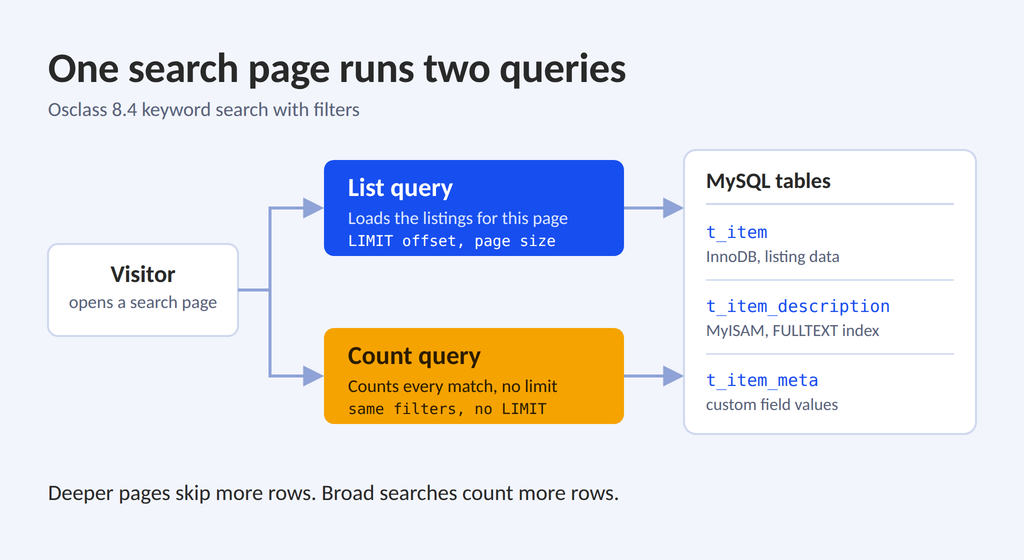
In the Osclass 8.4 install structure all tables use InnoDB except one. The table with listing titles and descriptions (t_item_description) uses MyISAM, because it carries the FULLTEXT index. Older sites can differ, because a table keeps the engine it was created with. Check yours with SHOW TABLE STATUS WHERE Name LIKE '%t_item%'; By default keyword search runs MATCH ... AGAINST in boolean mode. In Settings you can switch to the NLP full-text method or to a plain "contains" search. This design has six side effects that you feel as the site grows:
ft_min_word_len). A search for "car", "van" or "tv" can return nothing, even with thousands of such listings. On a server you control, set the value to 3 in the MySQL config and rebuild the index with REPAIR TABLE ... QUICK (the MySQL manual describes this setting). Make a backup first. On shared hosting, the "contains" method can be better for a small site.t_latest_searches. This table has no index and no primary key. Cron purges old rows by a time setting, so check that it fits your traffic.If keyword search is the main way your visitors find things, test it with real words from your niche before launch. Try short words, brand names and typos. It takes 20 minutes and finds problems that a listing count never shows.
When search is the heart of your site and traffic keeps growing, the real answer is a search engine like Elasticsearch, Meilisearch or Typesense next to MySQL. Osclass has a filter on the keyword condition (search_cond_pattern), so it can be connected, but this is custom work.
In Osclass 8.4 the main listing table (t_item) has indexes on user, category, publish date, price, premium flag, currency and contact email. It has no index on the expiration date and none on the enabled, active and spam flags. Yet public queries filter on exactly these: only enabled, active, not spam and not expired listings can show.
On a small site this does not matter. On a big site MySQL picks one index, usually category or date, and then reads many rows just to throw them away. Sorting makes it worse: a category filter and a sort by price use different indexes, so MySQL can end up sorting a big set in a temporary table. EXPLAIN shows this as "Using temporary" or "Using filesort".
Custom fields have their own weak point. In the search controller each custom field filter becomes a separate subquery on t_item_meta: listing ID IN (SELECT ... WHERE field = X AND value = Y). Text fields use LIKE with a percent sign on both sides, which scans. The only index on the value column starts with the value, and the primary key starts with the listing ID. So no index starts with the field ID. Car and real estate sites feel this first, because visitors combine year, mileage, rooms and price in one search. A flat table with one column per attribute is a way around it. Ultimate Attributes PRO works this way and rebuilds its table when you change the attributes.
I do not add indexes by guessing. My routine:
EXPLAIN on the slowest and most frequent queries.EXPLAIN again and compare.Two candidates worth testing, one for category pages and one for custom field filters:
ALTER TABLE oc_t_item ADD INDEX idx_list (fk_i_category_id, b_enabled, b_active, b_spam, dt_pub_date);
ALTER TABLE oc_t_item_meta ADD INDEX idx_field_value (fk_i_field_id, s_value(100));
These are examples, not copy and paste fixes. Your table prefix can differ, your plugins add their own queries, and every index makes writes slower and uses disk space. Test first, keep a backup.
No. The sample config says it plainly: the default cache is a dummy one that only imitates a cache. Out of the box nothing is cached between requests, and each search page sends both queries to MySQL. Real caching starts when you set OSC_CACHE to memcache, memcached, redis, apc or apcu in config.php. After that Osclass caches categories, countries, regions, cities, their counters and search results. A search result is stored under a key built from the SQL text and the visitor language.
The default life of an entry is 60 seconds (OSC_CACHE_TTL). That sounds short, but on a busy category page it means one query per minute instead of hundreds, and new listings still show up within a minute. This is object cache, which is a different layer from a full page cache. The Cache plugin is the page cache, and the cache plugin guide explains where each layer helps.
If your theme shows premium listings on list pages, one more query runs there. It joins the statistics table, groups by listing, adds up all premium views each listing ever had, sorts by that sum in buckets (SEARCH_PREMIUM_RAND_PARAM, default 2, so buckets of 2,000 views) and then by RAND().
My conclusion from this code: the cost grows with the number of premium listings and with the age of your statistics, because t_item_stats keeps one row per listing per day (the Osclass statistics article explains the table and its retention). Without a cache, this query runs on every list page. With a cache there is a catch. For guests the cache key contains the PHP session ID, so each guest gets their own entry and the hit rate for this block is low. Bots without cookies fill the cache with entries that nobody reuses. This is my reading of the code, so check it on your cache backend, and test list pages with many premium listings, not only five.
The numbers on your home page, like "Cars (12,430)", are not counted live. Osclass keeps them in stats tables and updates them from cron. In 8.4:
MAX_ITEMS_PER_ALERT, changeable in config.php). Offer daily as the default and keep instant for people who ask for it.Osclass has a built-in cron option, but the dashboard itself warns that it is not reliable for production. It also warns when the hourly cron did not run for 3 hours. This warning shows only on the dashboard, so if you rarely open the admin, you will not see it, and your counters go stale without any sign on the public site. Use a real server cron job. As admin you can run a job by hand and see the output:
/index.php?page=cron&type=daily&force=1&print=1Osclass saves each photo in several files: normal, preview, thumbnail and, if you keep originals, the original too. Photos go into numbered folders, one folder for every 100 listing IDs, so no single folder gets huge.
The total still adds up. Example: 100,000 listings with 5 photos each and 3 files per photo gives 1,500,000 files. With originals kept it is 2,000,000. Backups of so many small files are slow, and some hosting plans limit the number of files (inodes), so you can hit the limit long before the disk is full. Check the inode limit before a big import, keep the original option off if you do not need it, and move photos to WebP, a CDN or S3 cloud image storage when traffic grows.
Write a clean-up rule before launch. In Osclass 8.4 search and list pages hide expired listings, but the rows and photos stay, because the core cron does not delete them. In January 2026 a user on our forum reported that every admin page on Osclass 8.2.1 took more than 5 seconds. After the site owner deleted about 80,000 expired listings, the speed improved a lot. The report does not say which query was the cause, so I use it as a field report, not as a benchmark.
There is an SEO side too. In core, the page of an expired listing still opens for visitors, and only the owner and the admin see a warning. A theme or plugin can change this, so check your theme. Thousands of old pages with no live offer are thin pages, and they can waste crawl time that your fresh listings need. The Osclass SEO guide covers crawlability and content quality in more detail.
My rule looks like this: expired listings stay 30 days so the owner can renew them, then they are deleted. While they stay, the page shows a clear "expired" message with links to similar listings, and it is not indexed. When a listing is gone for good, a 404 or 410 response tells Google to drop the page (Google explains how it treats these codes). 410 is the more explicit one, and Osclass already returns 410 for a listing that does not exist.
Old listings cost you nothing in the first month. They cost you in year two, when you try to find out why everything got slow. Decide the clean-up rule before launch.
Osclass 8.4 writes statistics only for visitors that look like real browsers. User agents with words like bot, crawl, curl or python are skipped. This keeps data clean, but the server still does the full work for those requests. Test it in one hour: compare the requests to listing and search URLs in your web server log with the views in your statistics. If the log shows many times more requests, bots are your load, not your listings. Scrapers that pretend to be a browser go the other way: they count as real visitors and inflate your numbers. For the fixes, read the AI bots and server load guide.
Osclass has debug tools in the core. In config.php you can set OSC_DEBUG_DB to see every query on a page, OSC_DEBUG_DB_LOG to write the queries to a log, and OSC_DEBUG_DB_EXPLAIN to add EXPLAIN output for each SELECT. Use them on a staging copy only, and never leave them on in production. My checks at every data size:
EXPLAIN on the slow ones.To fill a staging site with realistic data, import in waves and measure between them, as I did in the 100,000 listings project. The Ad Importer plugin loads CSV, XML and JSON files for this.
When the numbers show a problem, I fix things in this order, because the first steps cost nothing: cron, slow queries and indexes, cache, photos, expired listings and bot rules, and only then a search engine. Front-end work, like merging CSS and JavaScript, is covered in the Osclass load speed guide.
Whatever software you pick, ask these before you pay. The answers tell you more than the number on the sales page.
To see how Osclass answers, install it, load a few thousand realistic listings, search like a visitor, run cron and look at the database. One afternoon gives you a better answer than any sales page, mine included. If you are still choosing a script, the Osclass vs competitors comparison is a good next read.
If you plan your own OLX or Craigslist style site, start with the general classifieds starter kit or download Osclass, and read how to launch an Osclass classifieds website that can grow.
For a marketplace with many sellers, see how to build a multi-vendor marketplace with Osclass Pay.
If you have a bigger project and want a second pair of eyes on your database, cron and cache setup, contact me.
Question: How many listings can a classifieds script handle?
Answer: There is no fixed number. The limit comes from keyword search, database indexes, cache, cron jobs, photo files and traffic, not from the listing count alone. I brought around 100,000 listings into one live Osclass site in about two days. Test your own data to find your limit.
Question: Is Osclass scalable?
Answer: Yes, with the right setup. In Osclass 8.4 the first limits are keyword search on a MyISAM full-text table, a few missing indexes and a cache that is off by default. Turn on a real cache, read the slow query log and keep cron running, and most sites go far.
Question: Can shared hosting run a classifieds website?
Answer: Yes, for a new site. Watch for signs that you outgrow it: resource warnings from your host, cron runs that get longer every week, a full slow query log and a slow admin panel. When you see them, move to a VPS.
Question: What slows down a classifieds website first?
Answer: Most often search and category queries, because the public listing queries filter on flags and the expiration date, and every search page also runs a count query. After that come cron jobs, premium listing blocks, photo files and bot traffic.
Question: Why does classifieds search not find short words like car or tv?
Answer: MyISAM full-text does not index words shorter than 4 letters by default (ft_min_word_len). After a backup, set it to 3 in your MySQL config and rebuild the index with REPAIR TABLE ... QUICK. On a small site you can also use the "contains" search method.
Question: Does Osclass cache search results by default?
Answer: No. The default cache only imitates a cache. Set OSC_CACHE to memcache, memcached, redis, apc or apcu in config.php to cache search results, categories and locations. The default cache time is 60 seconds (OSC_CACHE_TTL).
Question: How often are category and city counters updated in Osclass?
Answer: Category counters update once a day and location counters every hour, both by cron. Locations are processed in batches, so a database with more than 22,000 cities needs about 22 hourly runs for a full refresh. If cron stops, the counters go stale.
Question: How many files do photos create on a classifieds site?
Answer: Osclass saves a normal, a preview and a thumbnail file for each photo, plus the original if you keep it. 100,000 listings with 5 photos each give 1,500,000 files, or 2,000,000 with originals. Check your hosting inode limit before a big import.
Question: What should I do with expired classified ads?
Answer: Write a rule before launch. For example: keep expired listings 30 days so owners can renew them, then delete them. Show a clear expired message and do not index the page. For listings removed for good, return a 404 or 410 response.
Question: Do I need Elasticsearch for a classifieds website?
Answer: Not at the start. MySQL full-text search is enough for most small and medium sites. Think about a search engine when search is still your slowest part after indexes, cache and clean-up. In Osclass this is custom work through the search condition filter.
Question: How can I test classifieds software before I launch?
Answer: Fill a staging copy in waves, starting with a small pilot batch. After each wave check home, category, search with filters, item page and admin, run cron by hand and read the slow query log. Also check inodes, backup time and restore time.